Covers the core concepts of LLM workflows: connecting language models to tools, handling responses, and building intelligent systems.
Toggle tooltip visibility. Hover over underlined terms for instant definitions.
Article links
Make inline references clickable
Introduction
This is the first article in a series exploring how to build intelligent agents with LangChain and LangGraph. We'll start with the fundamental concepts that form the foundation of all agent-based systems.
Modern AI applications often need to do more than just generate text - they need to take actions in the real world. LLM workflows enable language models to interact with external systems by giving them access to tools and functions.
In this foundational guide, you'll learn the core building blocks:
- How to connect language models to external tools
- Design robust tool schemas that models can understand
- Handle tool responses and create reliable workflows
- Build systems that feel natural and intelligent
Let's start by setting up our environment and understanding these essential concepts.
Creating a Customer Support Agent
Let's design a straightforward agent capable of automatically drafting responses to customers and categorizing the responses.
Setting Up the Environment
First, we'll import the essential components for building our agentic workflow:
init_chat_modelfor initializing language modelstooldecorator for creating callable functions
from langchain.chat_models import init_chat_model
from rich.markdown import Markdown
from langchain.tools import tool
from pprint import pprint
import jsonllm = init_chat_model("google_vertexai:gemini-2.0-flash", temperature=0)
type(llm)langchain_google_vertexai.chat_models.ChatVertexAI
Initializing the Language Model
The init_chat_model function provides a unified interface for working with different language model providers. Here we're using Google's Vertex AI with the Gemini 2.0 Flash model, which offers a good balance of speed and capability for agentic tasks.
The temperature=0 setting ensures deterministic outputs, which is important for reliable tool usage.
Note: While temperature=0 aims for more deterministic outputs, LLMs often end up being non-deterministic due to various factors. For a deeper understanding of this topic, see Why LLMs Are Not Deterministic.
result = llm.invoke("Hello, are you there?")
print(type(result))
Markdown(result.content)<class 'langchain_core.messages.ai.AIMessage'>
Yes, I am here. How can I help you today?
Let's test our model with a simple interaction to ensure it's working correctly. The response comes back as an AIMessage object, which is LangChain's standard format for model outputs.
@tool
def draft_customer_reply(customer_name: str, request_category: str, reply: str) -> str:
    """Draft a reply to a customer."""
    return f"I am drafting a reply to {customer_name} in the category {request_category}.\n Content: {reply}"


type(draft_customer_reply)langchain_core.tools.structured.StructuredTool
Creating Tools for Our Agent
Tools are the bridge between language models and external actions. The @tool decorator automatically converts a Python function into a format that language models can understand and invoke.
Our draft_customer_reply function demonstrates the key principles of good tool design:
- Clear purpose: The function does one thing well
- Type annotations: Parameters have explicit types for validation
- Descriptive docstring: Helps the model understand when and how to use the tool
- Return value: Provides feedback about the action taken
In a real application, this would integrate with a CRM, WhatsApp, Telegram, or other type of service or API.
Understanding Tool Schemas
The @tool decorator automatically generates a JSON schema that describes the function's parameters. This schema is what the language model uses to understand how to call the tool correctly.
Let's examine the generated schema to see how our type annotations are converted into a format the model can understand:
print(json.dumps(draft_customer_reply.args, indent=2)){
"customer_name": {
"title": "Customer Name",
"type": "string"
},
"request_category": {
"title": "Request Category",
"type": "string"
},
"reply": {
"title": "Reply",
"type": "string"
}
}Connecting Tools to the Language Model
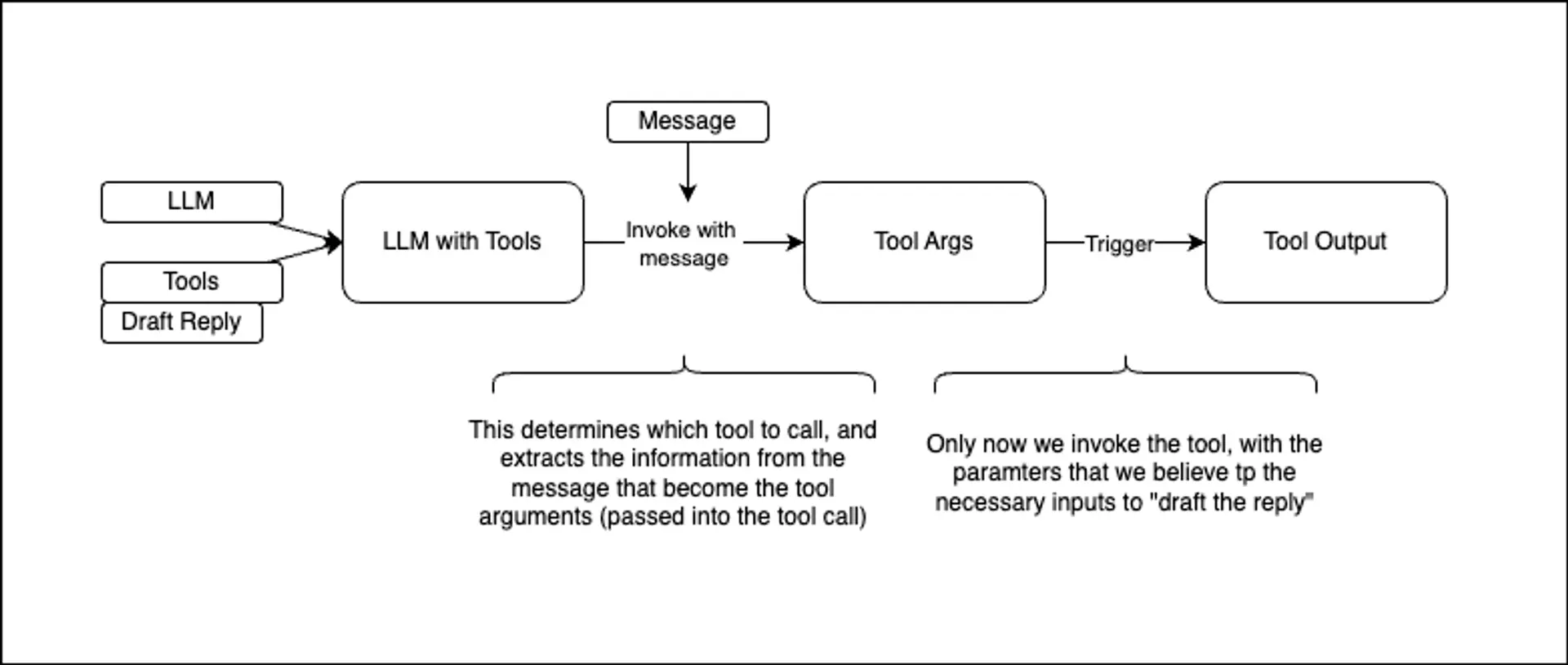
Now comes the crucial step: binding our tools to the language model. This creates an enhanced model that can both generate text and make tool calls when appropriate.
The bind_tools method configures how the model should interact with our tools:
tool_choice="any"forces the model to choose at least one toolparallel_tool_calls=Falseensures tools are called sequentially for predictable behavior
# Hook up the tools to the model
model_with_tools = llm.bind_tools(
    [draft_customer_reply], tool_choice="any", parallel_tool_calls=False
)# Calling the llm that has access to the tools
# In a real application, we would use a inbound message to populate this.
output = model_with_tools.invoke(
"Let John know that his request for a refund has been processed."
)
type(output)langchain_core.messages.ai.AIMessage
Testing the Agent
Let's test our tool-enabled model with a natural language request. Notice how we can give the model a high-level instruction, and it automatically decides to use the reply tool with appropriate parameters.
pprint(output.model_dump(), indent=2){ 'additional_kwargs': { 'function_call': { 'arguments': '{"reply": "Your '
'request for a refund '
'has been '
'processed.", '
'"customer_name": '
'"John", '
'"request_category": '
'"Refund"}',
'name': 'draft_customer_reply'}},
'content': '',
'example': False,
'id': 'run--f4974adb-bb6b-4ce9-9212-6e024835befe-0',
'invalid_tool_calls': [],
'name': None,
'response_metadata': { 'avg_logprobs': -0.008134446066358814,
'finish_reason': 'STOP',
'is_blocked': False,
'model_name': 'gemini-2.0-flash',
'safety_ratings': [],
'usage_metadata': { 'cache_tokens_details': [],
'cached_content_token_count': 0,
'candidates_token_count': 23,
'candidates_tokens_details': [ { 'modality': 1,
'token_count': 23}],
'prompt_token_count': 43,
'prompt_tokens_details': [ { 'modality': 1,
'token_count': 43}],
'thoughts_token_count': 0,
'total_token_count': 66}},
'tool_calls': [ { 'args': { 'customer_name': 'John',
'reply': 'Your request for a refund has been '
'processed.',
'request_category': 'Refund'},
'id': 'c7a68211-21f9-4adb-8f34-733d0fc25110',
'name': 'draft_customer_reply',
'type': 'tool_call'}],
'type': 'ai',
'usage_metadata': { 'input_token_details': {'cache_read': 0},
'input_tokens': 43,
'output_tokens': 23,
'total_tokens': 66}}Examining the Tool Call Response
The model's response contains rich metadata about the tool call it wants to make. The tool_calls array shows us exactly what the model intends to do:
- Which tool to call (
draft_customer_reply) - What arguments to pass
- A unique ID for tracking the call
This structured approach ensures reliable execution and makes it easy to handle complex multi-step workflows.
args = output.tool_calls[0]["args"]
print(json.dumps(args, indent=2)){
"reply": "Your request for a refund has been processed.",
"customer_name": "John",
"request_category": "Refund"
}Let's extract the arguments the model wants to pass to our tool. Notice how it inferred reasonable values for all required parameters based on our natural language request.
Executing the Tool
Finally, we can execute the actual tool with the model's proposed arguments. This completes the agentic workflow: from natural language instruction to structured tool call to real-world action.
result = draft_customer_reply.invoke(args)
Markdown(result)I am drafting a reply to John in the category Refund. Content: Your request for a refund has been processed.
Key Takeaways
You've just built the foundation for intelligent AI systems that can take real-world actions. This LLM workflow pattern forms the core of all agent-based applications.
What you've learned:
- Creating tools that language models can understand and invoke
- Binding tools to models for seamless integration
- Handling structured tool calls and responses
- Building reliable workflows from natural language to actions
Where to go next: Part Two of this series will explore agentic workflows - systems that are not fully autonomous yet, but can plan, reason, and execute multi-step tasks autonomously. While this article focused on the fundamentals of LLM workflows, the next will show you how to build a more sophisticated solution.
Putting It All Together
Let's create a minimal CLI tool that demonstrates everything we've learned. Save this as reply_agent.py and run it from your terminal:
from langchain.chat_models import init_chat_model
from langchain.tools import tool

@tool
def draft_customer_reply(customer_name: str, request_category: str, reply: str) -> str:
    """Draft a reply to a customer."""
    return f"I am drafting a reply to {customer_name} in the category {request_category}.\n Content: {reply}"


def main():
    # Initialize model
    llm = init_chat_model(
        "google_vertexai:gemini-2.0-flash",
        temperature=0
    )

    agent = llm.bind_tools(
        [draft_customer_reply],
        tool_choice="any", # force using a tool
        parallel_tool_calls=False
    )

    # Get user input
    request = input("What message would you like to send? ")

    # Get tool call from model
    response = agent.invoke(request)

    if response.tool_calls:
        # Execute the tool
        args = response.tool_calls[0]["args"]
        result = draft_customer_reply.invoke(args)
        print(f"Result: {result}")
    else:
        print("No reply needed.")

if __name__ == "__main__":
    main()
Usage: python reply_agent.py then type 'Let John know that his request for a refund has been processed.'
print("What message would you like to send?")
print("tell frank pacakge is on the way")
print("Result: I am drafting a reply to Marco in the category Package Delivery.")
print("Content: Frank, your package is on the way!")What message would you like to send? tell frank pacakge is on the way Result: I am drafting a reply to Marco in the category Package Delivery. Content: Frank, your package is on the way!
Conculusion
The magic of this approach lies in how the language model (LLM) is able to automatically determine the correct parameters to pass into the tool call. When given a user request, the LLM interprets the intent and extracts the necessary information, mapping it to the tool's expected arguments without explicit instruction. This seamless orchestration between natural language understanding and structured tool invocation is what enables such intelligent agent behavior.
Reference
Citation details
Cite or share this article.
Stay up to date
Get articles, book updates, and news delivered to your inbox.
No spam, unsubscribe anytime.
Join the community
Sign in to remove popups, track your reading progress, and join the discussion.

Comments
No comments yet. Be the first to share your thoughts!