Building AI Agents with LangChain and LangGraph: Part 1 › Connecting Tools to the Language Model
Building AI Agents with LangChain and LangGraph: Part 1 › Connecting Tools to the Language ModelOne section · Sections in this article5 / 8 ↓
Reading tools Definitions & inline links
Toggle tooltip visibility. Hover over underlined terms for instant definitions.
Article links
Make inline references clickable
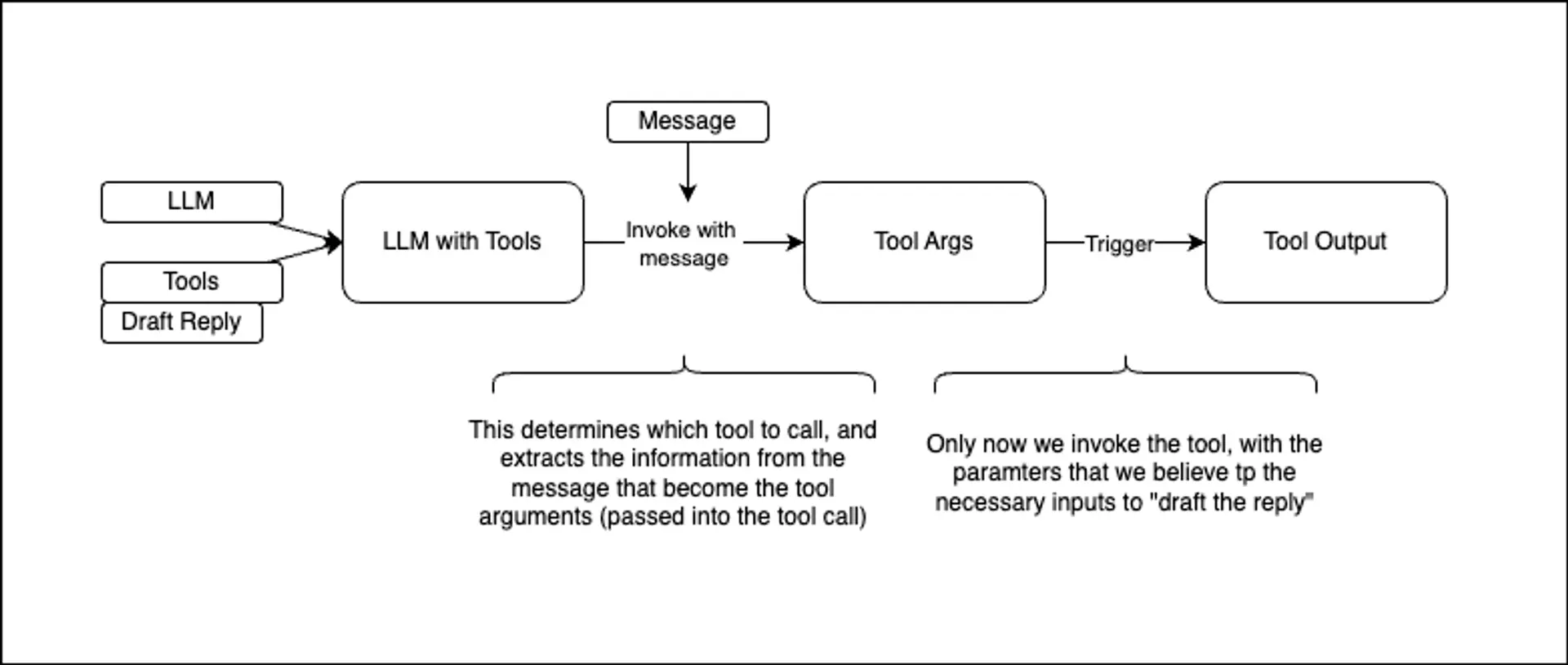
Now comes the crucial step: binding our tools to the language model. This creates an enhanced model that can both generate text and make tool calls when appropriate.
The bind_tools method configures how the model should interact with our tools:
tool_choice="any"forces the model to choose at least one toolparallel_tool_calls=Falseensures tools are called sequentially for predictable behavior
# Hook up the tools to the model
model_with_tools = llm.bind_tools(
    [draft_customer_reply], tool_choice="any", parallel_tool_calls=False
)# Calling the llm that has access to the tools
# In a real application, we would use a inbound message to populate this.
output = model_with_tools.invoke(
"Let John know that his request for a refund has been processed."
)
type(output)langchain_core.messages.ai.AIMessage
Testing the Agent
Let's test our tool-enabled model with a natural language request. Notice how we can give the model a high-level instruction, and it automatically decides to use the reply tool with appropriate parameters.
pprint(output.model_dump(), indent=2){ 'additional_kwargs': { 'function_call': { 'arguments': '{"reply": "Your '
'request for a refund '
'has been '
'processed.", '
'"customer_name": '
'"John", '
'"request_category": '
'"Refund"}',
'name': 'draft_customer_reply'}},
'content': '',
'example': False,
'id': 'run--f4974adb-bb6b-4ce9-9212-6e024835befe-0',
'invalid_tool_calls': [],
'name': None,
'response_metadata': { 'avg_logprobs': -0.008134446066358814,
'finish_reason': 'STOP',
'is_blocked': False,
'model_name': 'gemini-2.0-flash',
'safety_ratings': [],
'usage_metadata': { 'cache_tokens_details': [],
'cached_content_token_count': 0,
'candidates_token_count': 23,
'candidates_tokens_details': [ { 'modality': 1,
'token_count': 23}],
'prompt_token_count': 43,
'prompt_tokens_details': [ { 'modality': 1,
'token_count': 43}],
'thoughts_token_count': 0,
'total_token_count': 66}},
'tool_calls': [ { 'args': { 'customer_name': 'John',
'reply': 'Your request for a refund has been '
'processed.',
'request_category': 'Refund'},
'id': 'c7a68211-21f9-4adb-8f34-733d0fc25110',
'name': 'draft_customer_reply',
'type': 'tool_call'}],
'type': 'ai',
'usage_metadata': { 'input_token_details': {'cache_read': 0},
'input_tokens': 43,
'output_tokens': 23,
'total_tokens': 66}}Examining the Tool Call Response
The model's response contains rich metadata about the tool call it wants to make. The tool_calls array shows us exactly what the model intends to do:
- Which tool to call (
draft_customer_reply) - What arguments to pass
- A unique ID for tracking the call
This structured approach ensures reliable execution and makes it easy to handle complex multi-step workflows.
args = output.tool_calls[0]["args"]
print(json.dumps(args, indent=2)){
"reply": "Your request for a refund has been processed.",
"customer_name": "John",
"request_category": "Refund"
}Let's extract the arguments the model wants to pass to our tool. Notice how it inferred reasonable values for all required parameters based on our natural language request.
Executing the Tool
Finally, we can execute the actual tool with the model's proposed arguments. This completes the agentic workflow: from natural language instruction to structured tool call to real-world action.
result = draft_customer_reply.invoke(args)
Markdown(result)I am drafting a reply to John in the category Refund. Content: Your request for a refund has been processed.