Simulating stock market returns using Monte Carlo › 6. Creating Meaningful Visualizations
Simulating stock market returns using Monte Carlo › 6. Creating Meaningful VisualizationsOne section · Sections in this article7 / 8 ↓
Reading tools Definitions & inline links
Toggle tooltip visibility. Hover over underlined terms for instant definitions.
Article links
Make inline references clickable
We'll create a series of focused visualizations to understand different aspects of our Monte Carlo simulation results. Each chart reveals different insights about the investment risk and return profile.
6.1 Portfolio Value Distribution
The histogram shows the spread of possible outcomes from our Monte Carlo simulation. This visualization helps us understand the likelihood of different portfolio values after 10 years.
# Portfolio Value Distribution Histogram
fig, ax = plt.subplots(figsize=(12, 8))

# Filter out values over $600 to focus on the main distribution
filtered_values = final_portfolio_values[final_portfolio_values <= 600]

# Creating histogram with modern aesthetics
n, bins, patches = ax.hist(filtered_values, bins=60, alpha=0.7,
                          edgecolor='white', linewidth=0.5, color='#3498db')

# Adding vertical lines for key percentiles with better positioning
percentiles = [5, 25, 50, 75, 95]
percentile_values = np.percentile(final_portfolio_values, percentiles)
colors = ['#e74c3c', '#f39c12', '#27ae60', '#f39c12', '#e74c3c']
labels = ['5th%', '25th%', 'Median', '75th%', '95th%']

max_height = n.max()
for i, (perc, val, color, label) in enumerate(zip(percentiles, percentile_values, colors, labels)):
    if val <= 600:
        ax.axvline(val, color=color, linestyle='-', linewidth=2, alpha=0.8)
        ax.text(val, max_height * (0.85 - i * 0.1), f'{label}\n${val:.0f}',
                ha='center', va='top', fontweight='600', fontsize=10,
                bbox=dict(boxstyle="round,pad=0.4", facecolor='white', alpha=0.9, edgecolor=color, linewidth=1.5),
                color='#2c3e50')

# Adding initial investment line for reference
ax.axvline(INITIAL_INVESTMENT, color='#2c3e50', linestyle='-', linewidth=2)
ax.text(INITIAL_INVESTMENT, max_height * 0.95, f'Initial\n${INITIAL_INVESTMENT:.0f}',
        ha='center', va='top', fontweight='600', fontsize=10,
        bbox=dict(boxstyle="round,pad=0.4", facecolor='white', alpha=0.9, edgecolor='#2c3e50', linewidth=1.5),
        color='#2c3e50')

# Calculate excluded scenarios
excluded_count = len(final_portfolio_values) - len(filtered_values)
excluded_pct = (excluded_count / len(final_portfolio_values)) * 100

ax.set_title(f"Portfolio Value Distribution After {YEARS} Years\n"
             f"Expected Return: {MU:.1%} • Volatility: {SIGMA:.1%} • {N_ITER:,} Simulations",
             fontsize=16, fontweight='600', pad=20, color='#2c3e50')
ax.set_xlabel("Final Portfolio Value ($)", fontsize=13, fontweight='500', color='#2c3e50')
ax.set_ylabel("Number of Simulations", fontsize=13, fontweight='500', color='#2c3e50')

# Adding summary statistics in a cleaner box
stats_text = f"Expected Value: ${final_portfolio_values.mean():.0f}\n" \
            f"Median: ${np.median(final_portfolio_values):.0f}\n" \
            f"Loss Probability: {prob_loss:.1f}%\n" \
            f"Double Probability: {prob_double:.1f}%"

ax.text(0.97, 0.97, stats_text, transform=ax.transAxes, fontsize=11, fontweight='600',
        va='top', ha='right', color='#2c3e50',
        bbox=dict(boxstyle="round,pad=0.5", facecolor='white', alpha=0.95,
                  edgecolor='#bdc3c7', linewidth=1))

# Clean up the plot
ax.grid(True, alpha=0.3, color='#ecf0f1')
ax.set_axisbelow(True)

plt.tight_layout()
plt.show()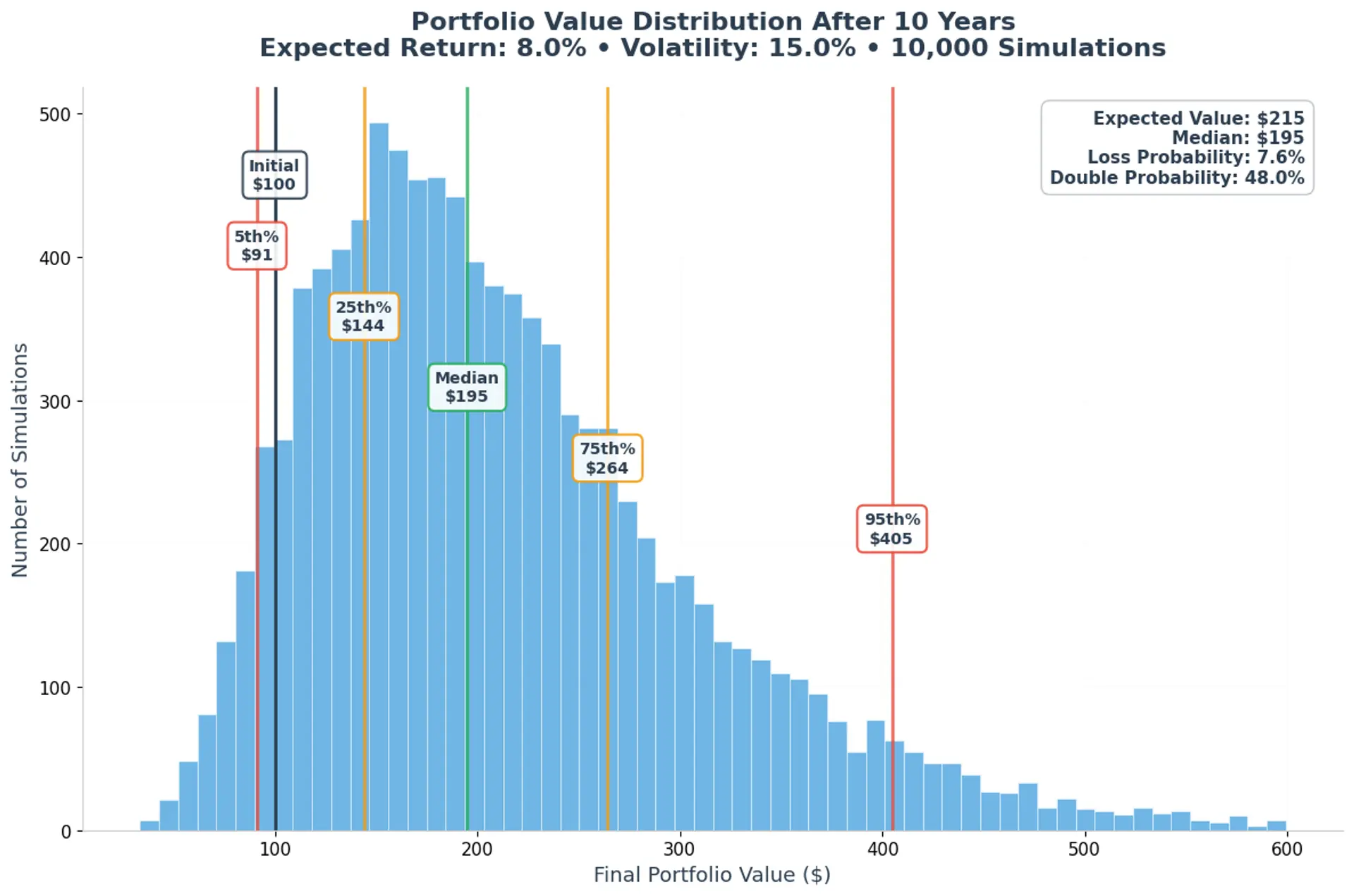
# Box Plot showing percentile ranges with modern styling
fig, ax = plt.subplots(figsize=(10, 8))

box_data = [final_portfolio_values]
bp = ax.boxplot(box_data, patch_artist=True, tick_labels=['Portfolio Values'],
               medianprops=dict(color='#27ae60', linewidth=2.5),
               boxprops=dict(facecolor='#3498db', alpha=0.6, edgecolor='#2980b9', linewidth=1.5),
               whiskerprops=dict(color='#34495e', linewidth=1.5),
               capprops=dict(color='#34495e', linewidth=1.5),
               flierprops=dict(marker='o', markerfacecolor='#e74c3c', alpha=0.5, markersize=4))

# Adding percentile annotations with cleaner styling
percentiles_to_show = [5, 25, 50, 75, 95]
perc_values = np.percentile(final_portfolio_values, percentiles_to_show)
colors = ['#e74c3c', '#f39c12', '#27ae60', '#f39c12', '#e74c3c']

for i, (perc, val, color) in enumerate(zip(percentiles_to_show, perc_values, colors)):
    ax.annotate(f'{perc}th: ${val:.0f}',
                xy=(1, val), xytext=(1.15, val),
                fontsize=11, ha='left', va='center', fontweight='600',
                color=color,
                arrowprops=dict(arrowstyle='->', color=color, alpha=0.7, lw=1.2))

ax.set_title('Portfolio Value Distribution Summary',
             fontweight='600', fontsize=16, color='#2c3e50', pad=20)
ax.set_ylabel('Portfolio Value ($)', fontweight='500', fontsize=13, color='#2c3e50')
ax.grid(True, alpha=0.3, color='#ecf0f1', axis='y')
ax.set_axisbelow(True)

# Remove top and right spines for cleaner look
ax.spines['top'].set_visible(False)
ax.spines['right'].set_visible(False)
ax.spines['left'].set_color('#bdc3c7')
ax.spines['bottom'].set_color('#bdc3c7')

plt.tight_layout()
plt.show()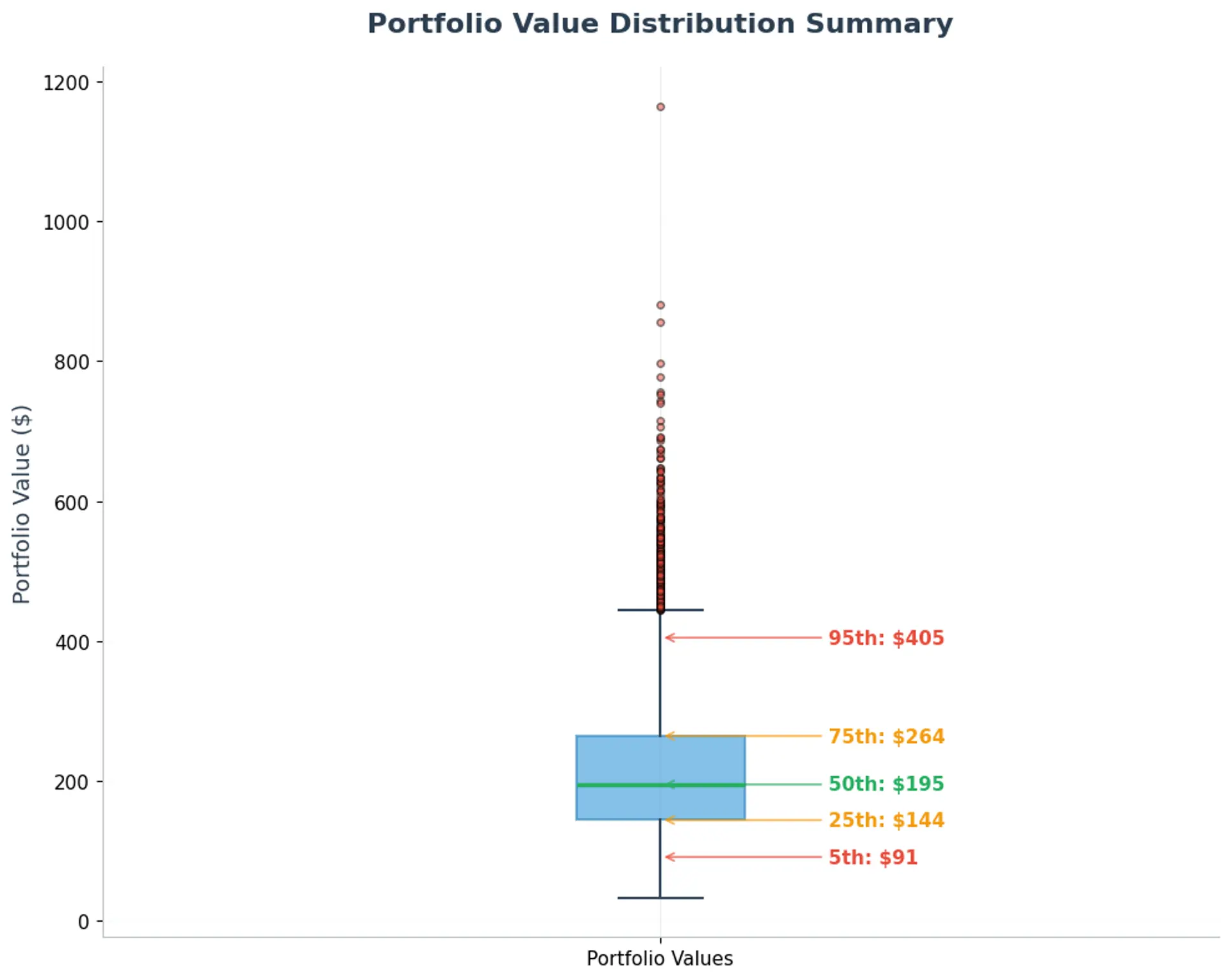
6.3 Cumulative Distribution Function (CDF)
The CDF shows the probability of achieving different portfolio values. This helps answer questions like "What's the probability my portfolio will be worth at least $200?"
# Cumulative Distribution Function (CDF) with modern styling
fig, ax = plt.subplots(figsize=(12, 8))

sorted_values = np.sort(final_portfolio_values)
cumulative_prob = np.arange(1, len(sorted_values) + 1) / len(sorted_values)

# Main CDF line with gradient-like effect
ax.plot(sorted_values, cumulative_prob * 100, linewidth=3, color='#3498db',
        label='Cumulative Probability', alpha=0.9)

# Reference lines
ax.axvline(INITIAL_INVESTMENT, color='#e74c3c', linestyle='--', alpha=0.8,
          linewidth=2, label='Break-even ($100)')
ax.axhline(50, color='#95a5a6', linestyle=':', alpha=0.7,
          linewidth=2, label='50% Probability')

# Key probability markers with modern styling
key_values = [150, 200, 250, 300]
marker_colors = ['#e67e22', '#f39c12', '#27ae60', '#8e44ad']

for val, color in zip(key_values, marker_colors):
    prob = (final_portfolio_values <= val).mean() * 100
    ax.plot(val, prob, 'o', markersize=8, color=color,
           markeredgecolor='white', markeredgewidth=2, zorder=5)
    ax.annotate(f'${val}: {prob:.0f}%',
               xy=(val, prob), xytext=(val+25, prob+8),
               fontsize=11, ha='left', fontweight='600', color=color,
               bbox=dict(boxstyle="round,pad=0.3", facecolor=color, alpha=0.15,
                        edgecolor=color, linewidth=1),
               arrowprops=dict(arrowstyle='->', color=color, alpha=0.7, lw=1.2))

ax.set_title('Cumulative Probability Distribution',
             fontweight='600', fontsize=16, color='#2c3e50', pad=20)
ax.set_xlabel('Portfolio Value ($)', fontweight='500', fontsize=13, color='#2c3e50')
ax.set_ylabel('Probability (%)', fontweight='500', fontsize=13, color='#2c3e50')

# Modern legend styling
ax.legend(fontsize=11, frameon=True, fancybox=True, shadow=False,
         facecolor='white', edgecolor='#bdc3c7', framealpha=0.9)

# Clean grid and spines
ax.grid(True, alpha=0.3, color='#ecf0f1')
ax.set_axisbelow(True)
ax.spines['top'].set_visible(False)
ax.spines['right'].set_visible(False)
ax.spines['left'].set_color('#bdc3c7')
ax.spines['bottom'].set_color('#bdc3c7')

plt.tight_layout()
plt.show()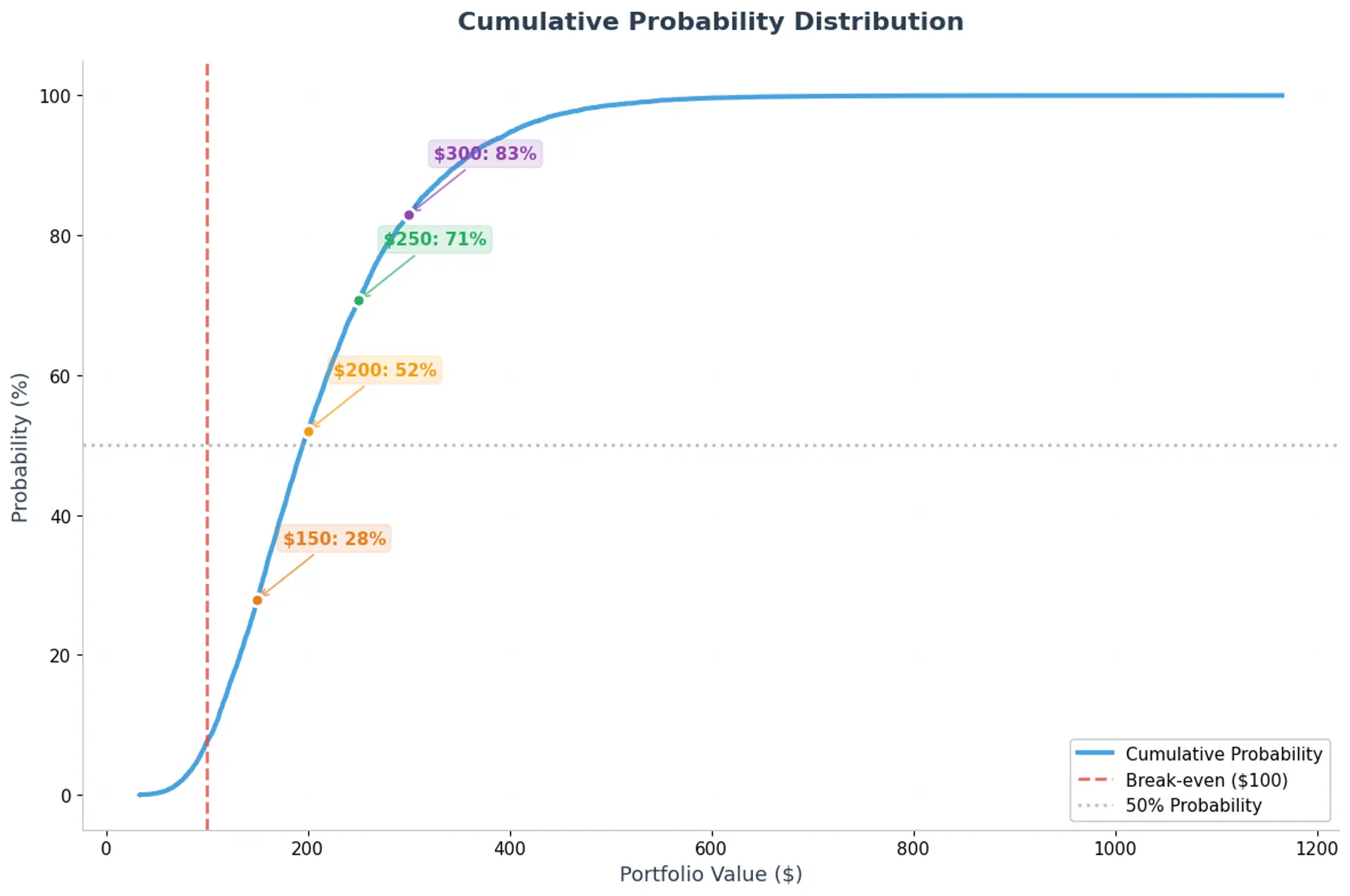
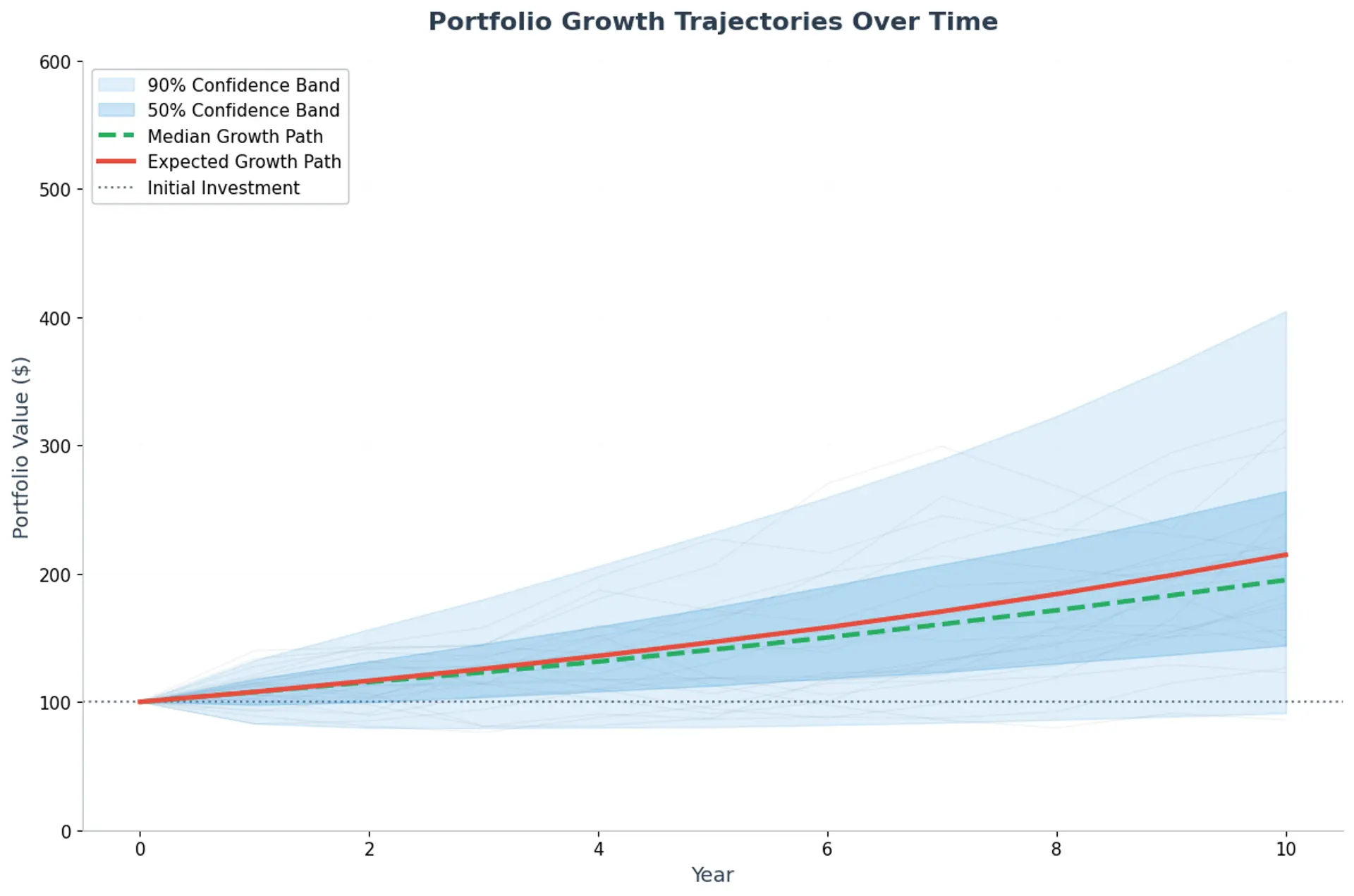
6.4 Portfolio Growth Over Time
This visualization shows how portfolio values evolve year by year, demonstrating the compound growth effect and the confidence band around the expected path.
# Portfolio growth over time with modern styling
fig, ax = plt.subplots(figsize=(12, 8))

# Calculate portfolio values for each year for sample scenarios
sample_scenarios = annual_returns[:100, :]  # First 100 scenarios
portfolio_evolution = np.zeros((100, YEARS + 1))  # +1 for initial value
portfolio_evolution[:, 0] = INITIAL_INVESTMENT

for year in range(YEARS):
    portfolio_evolution[:, year + 1] = portfolio_evolution[:, year] * (1 + sample_scenarios[:, year])

# Plot sample paths (very light gray lines)
for i in range(20):
    ax.plot(np.arange(YEARS + 1), portfolio_evolution[i, :],
           alpha=0.15, color='#95a5a6', linewidth=0.8, zorder=1)

# Calculate evolution for all scenarios for confidence bands
all_portfolio_evolution = np.zeros((N_ITER, YEARS + 1))
all_portfolio_evolution[:, 0] = INITIAL_INVESTMENT

for year in range(YEARS):
    all_portfolio_evolution[:, year + 1] = all_portfolio_evolution[:, year] * (1 + annual_returns[:, year])

# Add confidence bands with gradient-like colors
percentile_5 = np.percentile(all_portfolio_evolution, 5, axis=0)
percentile_95 = np.percentile(all_portfolio_evolution, 95, axis=0)
percentile_25 = np.percentile(all_portfolio_evolution, 25, axis=0)
percentile_75 = np.percentile(all_portfolio_evolution, 75, axis=0)

# Fill confidence bands with different opacities
ax.fill_between(np.arange(YEARS + 1), percentile_5, percentile_95,
               alpha=0.15, color='#3498db', label='90% Confidence Band', zorder=2)
ax.fill_between(np.arange(YEARS + 1), percentile_25, percentile_75,
               alpha=0.25, color='#3498db', label='50% Confidence Band', zorder=3)

# Plot median line
median_evolution = np.percentile(all_portfolio_evolution, 50, axis=0)
ax.plot(np.arange(YEARS + 1), median_evolution, linewidth=3, color='#27ae60',
        linestyle='--', label='Median Growth Path', zorder=4)

# Plot average evolution
mean_evolution = all_portfolio_evolution.mean(axis=0)
ax.plot(np.arange(YEARS + 1), mean_evolution, linewidth=3, color='#e74c3c',
        label='Expected Growth Path', zorder=5)

# Add initial investment reference line
ax.axhline(INITIAL_INVESTMENT, color='#34495e', linestyle=':', alpha=0.7,
          linewidth=1.5, label='Initial Investment')

ax.set_title('Portfolio Growth Trajectories Over Time',
             fontweight='600', fontsize=16, color='#2c3e50', pad=20)
ax.set_xlabel('Year', fontweight='500', fontsize=13, color='#2c3e50')
ax.set_ylabel('Portfolio Value ($)', fontweight='500', fontsize=13, color='#2c3e50')

# Modern legend styling
ax.legend(fontsize=11, frameon=True, fancybox=True, shadow=False,
         facecolor='white', edgecolor='#bdc3c7', framealpha=0.9,
         loc='upper left')

# Clean grid and spines
ax.grid(True, alpha=0.3, color='#ecf0f1')
ax.set_axisbelow(True)
ax.spines['top'].set_visible(False)
ax.spines['right'].set_visible(False)
ax.spines['left'].set_color('#bdc3c7')
ax.spines['bottom'].set_color('#bdc3c7')

# Set reasonable y-axis limits to avoid extreme outliers
ax.set_ylim(0, 600)

plt.tight_layout()
plt.show()