Building AI Agents with LangChain and LangGraph: Part 2 › Advanced Workflow Patterns
Building AI Agents with LangChain and LangGraph: Part 2 › Advanced Workflow PatternsOne section · Sections in this article5 / 9 ↓
Reading tools Definitions & inline links
Toggle tooltip visibility. Hover over underlined terms for instant definitions.
Article links
Make inline references clickable
While our first example was linear, real agentic systems need conditional logic, loops, and decision points. Let's build a more sophisticated workflow that can handle different types of responses from the language model.
Building a Conversational Agent
This workflow introduces several sophisticated concepts:
MessagesState: LangGraph's built-in state for handling conversations- Conditional edges: Logic that determines which node to execute next
- Tool message handling: Proper formatting of tool responses for the model
- Conversation loops: The ability to continue dialogues naturally
The should_continue function demonstrates conditional routing - a key pattern in agentic systems where the workflow's next step depends on the current state.
def call_llm(state: MessagesState) -> MessagesState:
    """Run LLM"""
    # Call the language model with the current messages in the state
    output = model_with_tools.invoke(state["messages"])
    # Return the output as a new messages list in the state
    return {"messages": [output]}


def run_tool(state: MessagesState):
    """Performs the tool call"""
    # Initialize a list to store tool responses
    result = []
    # Iterate over all tool calls in the last message
    for tool_call in state["messages"][-1].tool_calls:
        # Invoke the tool with the provided arguments
        observation = draft_customer_reply.invoke(tool_call["args"])
        # Append the tool's response in the required format
        result.append(
            {"role": "tool", "content": observation, "tool_call_id": tool_call["id"]}
        )
    # Return the tool responses as the new messages in the state
    return {"messages": result}


def should_continue(state: MessagesState) -> Literal["run_tool", "__end__"]:
    """Route to tool handler, or end if Done tool called"""
    # Get the list of messages from the state
    messages = state["messages"]
    # Get the last message in the conversation
    last_message = messages[-1]

    # If the last message contains tool calls, continue to the tool handler
    if last_message.tool_calls:
        return "run_tool"
    # Otherwise, end the workflow (reply to the user)
    return END


# Initialize the workflow graph with the MessagesState schema
workflow = StateGraph(MessagesState)

# Add the node that calls the LLM
workflow.add_node("call_llm", call_llm)
# Add the node that runs the tool
workflow.add_node("run_tool", run_tool)

# Add an edge from the start node to the call_llm node
workflow.add_edge(START, "call_llm")
# Add conditional edges from call_llm node based on should_continue function
workflow.add_conditional_edges(
    # The node to branch from
    "call_llm",
    # The function that determines which edge to take next
    should_continue,
    # Mapping of possible return values to the next node
    {
        "run_tool": "run_tool",  # If should_continue returns "run_tool", go to run_tool node
        END: END,  # If should_continue returns END, end the workflow
    },
)
# Add an edge from run_tool node to the end node
workflow.add_edge("run_tool", END)

# Compile the workflow into an executable application
app = workflow.compile()
Visualizing Complex Workflows
This graph shows the conditional logic in action. Notice how call_llm can either end the conversation or route to run_tool, depending on whether tool calls are present in the response.
Image(app.get_graph().draw_mermaid_png())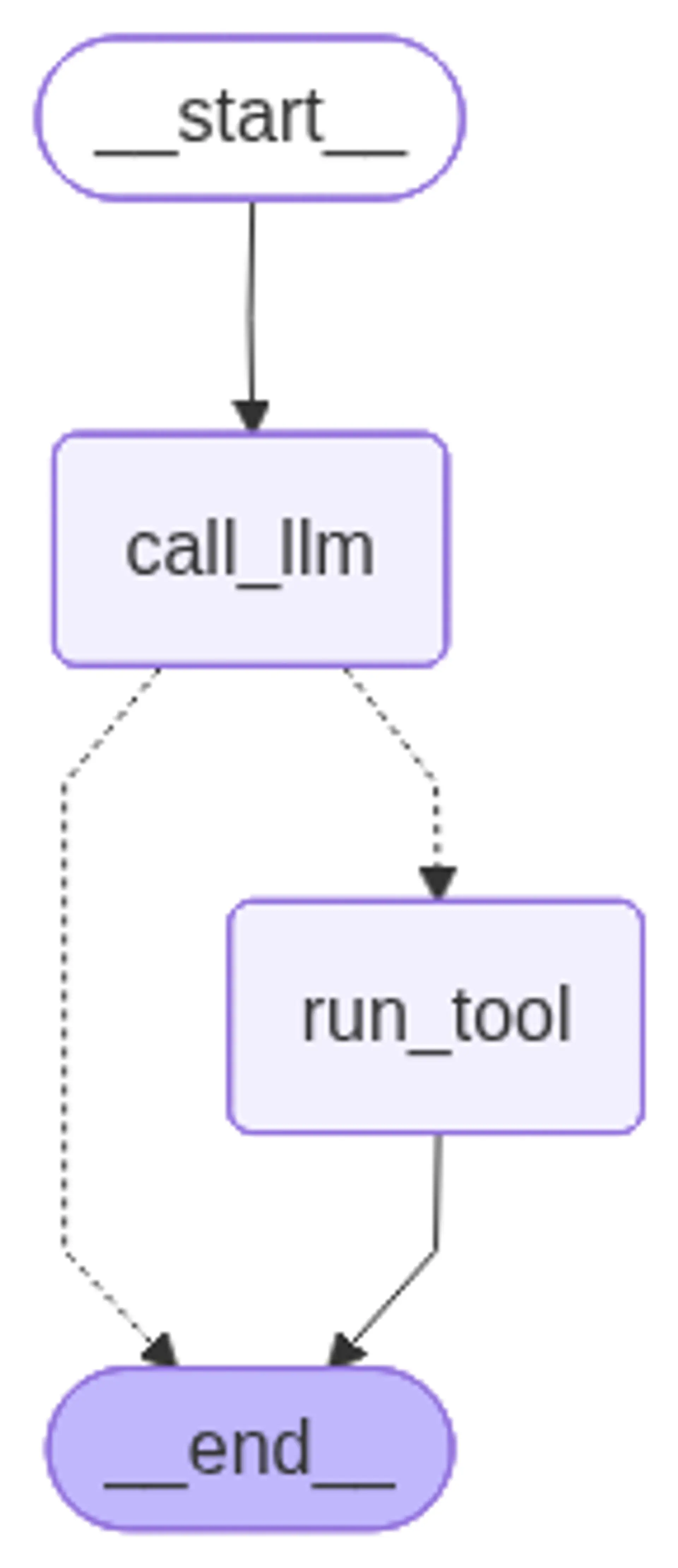
Testing the Conversational Agent
Watch how our agent processes the request:
- Receives the human message
- Generates a tool call with appropriate parameters
- Executes the tool
- Returns the formatted result
This demonstrates the complete agent lifecycle in a production-ready pattern.
result = app.invoke(
    {
        "messages": [
            {
                "role": "user",
                # content is the user's request
                "content": "Let Frank know that his refund has been processed.",
            },
        ]
    }
)
for m in result["messages"]:
m.pretty_print()================================[1m Human Message [0m=================================
Let Frank know that his refund has been processed.
==================================[1m Ai Message [0m==================================
Tool Calls:
draft_customer_reply (8ad00c73-7cae-4011-9a08-7a082d7f9798)
Call ID: 8ad00c73-7cae-4011-9a08-7a082d7f9798
Args:
request_category: Refund
customer_name: Frank
reply: Your refund has been processed.
=================================[1m Tool Message [0m=================================
I am drafting a reply to Frank in the category Refund.
Content: Your refund has been processed.