Text Preprocessing: Tokenization › Building a Preprocessing Pipeline
Text Preprocessing: Tokenization › Building a Preprocessing PipelineOne section · Sections in this article3 / 8 ↓
Reading tools Definitions & inline links
Choose your expertise level to adjust how many terms are explained. Beginners see more tooltips, experts see fewer to maintain reading flow. Hover over underlined terms for instant definitions.
Article links
Make inline references clickable
We've now explored the three core preprocessing operations: tokenization breaks text into units, normalization reduces variation, and cleaning removes noise. But understanding individual techniques isn't enough. We need to combine them into a cohesive pipeline that turns raw, messy text into clean, structured tokens ready for machine learning models.
Why pipelines matter: Each preprocessing technique solves a specific problem, but they work together to solve the larger challenge of making human language computable. Tokenization must happen first (you can't normalize or clean what you haven't identified), but the order of normalization and cleaning depends on your task.
The pipeline as a transformation chain: Think of preprocessing as a series of transformations, each building on the previous one:
- Raw text → (tokenization) → Tokens
- Tokens → (normalization) → Normalized tokens
- Normalized tokens → (cleaning) → Clean, normalized tokens
But this linear view is too simplistic. In practice, some cleaning happens before tokenization (removing HTML), some normalization happens during tokenization (handling contractions), and the exact sequence depends on your task requirements.
Let's build a complete preprocessing pipeline that demonstrates how these techniques work together, and then explore how different configurations affect the same input text.
Pipeline Design Principles
A preprocessing pipeline should be:
- Modular: Each step is a separate function that can be enabled, disabled, or reordered
- Reproducible: The same input always produces the same output
- Efficient: Expensive operations are applied only when necessary
- Transparent: Easy to inspect intermediate results for debugging
We'll create a TextPreprocessor class that accepts configuration options and applies preprocessing steps in sequence. The key insight is that different tasks require different combinations of techniques, so the pipeline should be configurable rather than fixed.
import re
import string
import nltk
from nltk.tokenize import word_tokenize
from nltk.corpus import stopwords
from nltk.stem import WordNetLemmatizer
import unicodedata

# Download required NLTK data
nltk.download("punkt_tab", quiet=True)
nltk.download("punkt", quiet=True)
nltk.download("stopwords", quiet=True)
nltk.download("wordnet", quiet=True)
nltk.download("omw-1.4", quiet=True)


class TextPreprocessor:
    """Flexible text preprocessing pipeline with configurable steps."""

    def __init__(
        self,
        lowercase=True,
        remove_punctuation=True,
        remove_numbers=False,
        remove_stopwords=True,
        lemmatize=True,
        remove_urls=True,
        remove_html=True,
        min_token_length=2,
    ):
        self.lowercase = lowercase
        self.remove_punctuation = remove_punctuation
        self.remove_numbers = remove_numbers
        self.remove_stopwords = remove_stopwords
        self.lemmatize = lemmatize
        self.remove_urls = remove_urls
        self.remove_html = remove_html
        self.min_token_length = min_token_length

        self.stop_words = set(stopwords.words("english"))
        self.lemmatizer = WordNetLemmatizer()
        self.punct_pattern = re.compile(f"[{re.escape(string.punctuation)}]")

    def normalize_unicode(self, text):
        return unicodedata.normalize("NFC", text)

    def clean_html(self, text):
        if self.remove_html:
            text = re.sub(r"<[^>]+>", "", text)
        return text

    def clean_urls(self, text):
        if self.remove_urls:
            text = re.sub(r"http\S+|www\.\S+", "", text)
        return text

    def normalize_whitespace(self, text):
        return re.sub(r"\s+", " ", text).strip()

    def tokenize(self, text):
        return word_tokenize(text)

    def process_tokens(self, tokens):
        processed = []
        for token in tokens:
            if self.lowercase:
                token = token.lower()
            if self.remove_punctuation:
                token = self.punct_pattern.sub("", token)
            if self.remove_numbers:
                token = re.sub(r"\d+", "", token)
            if len(token) < self.min_token_length:
                continue
            if self.remove_stopwords and token in self.stop_words:
                continue
            if self.lemmatize:
                token = self.lemmatizer.lemmatize(token, pos="v")
                token = self.lemmatizer.lemmatize(token, pos="n")
            processed.append(token)
        return processed

    def preprocess(self, text):
        """Apply full preprocessing pipeline to text."""
        text = self.normalize_unicode(text)
        text = self.clean_html(text)
        text = self.clean_urls(text)
        text = self.normalize_whitespace(text)
        tokens = self.tokenize(text)
        tokens = self.process_tokens(tokens)
        return tokens

    def preprocess_batch(self, texts):
        """Preprocess a batch of texts."""
        return [self.preprocess(text) for text in texts]
Pipeline in Action
Let's see how different configurations affect the same input text. We'll test three strategies on a technical sentence containing HTML, URLs, and mixed formatting:
# Sample text with various challenging elements
text = """
<p><b>K-means Clustering Algorithm</b></p>
<p>The running time of K-means is O(n*k*t) where n=1000, k=5, t=10 iterations!</p>
<p>Visit https://scikit-learn.org/stable/modules/clustering.html for implementation details.</p>
<p>It's REALLY fast... MUCH faster than hierarchical clustering (O(n²) vs O(n*k*t)).</p>
<p>Contact: researcher@example.com or call 555-1234 for questions.</p>
<p>The algorithm's performance is AMAZING!!! It handles datasets with 10,000+ points efficiently.</p>
<p>Don't forget: preprocessing matters! The data should be normalized before clustering.</p>
"""

# Configuration 1: Minimal preprocessing (for transformers)
preprocessor_minimal = TextPreprocessor(
    lowercase=True,
    remove_punctuation=False,
    remove_numbers=False,
    remove_stopwords=False,
    lemmatize=False,
    remove_urls=True,
    remove_html=True,
    min_token_length=1,
)

# Configuration 2: Aggressive preprocessing (for classical models)
preprocessor_aggressive = TextPreprocessor(
    lowercase=True,
    remove_punctuation=True,
    remove_numbers=True,
    remove_stopwords=True,
    lemmatize=True,
    remove_urls=True,
    remove_html=True,
    min_token_length=3,
)

# Configuration 3: Balanced preprocessing
preprocessor_balanced = TextPreprocessor(
    lowercase=True,
    remove_punctuation=True,
    remove_numbers=False,
    remove_stopwords=True,
    lemmatize=True,
    remove_urls=True,
    remove_html=True,
    min_token_length=2,
)

# Compare results
results = {
    "Minimal": preprocessor_minimal.preprocess(text),
    "Aggressive": preprocessor_aggressive.preprocess(text),
    "Balanced": preprocessor_balanced.preprocess(text),
}

for strategy, tokens in results.items():
    print(f"{strategy}: {tokens}")
print(f"Token count: {len(tokens)}\n")Minimal: ['k-means', 'clustering', 'algorithm', 'the', 'running', 'time', 'of', 'k-means', 'is', 'o', '(', 'n', '*', 'k', '*', 't', ')', 'where', 'n=1000', ',', 'k=5', ',', 't=10', 'iterations', '!', 'visit', 'for', 'implementation', 'details', '.', 'it', "'s", 'really', 'fast', '...', 'much', 'faster', 'than', 'hierarchical', 'clustering', '(', 'o', '(', 'n²', ')', 'vs', 'o', '(', 'n', '*', 'k', '*', 't', ')', ')', '.', 'contact', ':', 'researcher', '@', 'example.com', 'or', 'call', '555-1234', 'for', 'questions', '.', 'the', 'algorithm', "'s", 'performance', 'is', 'amazing', '!', '!', '!', 'it', 'handles', 'datasets', 'with', '10,000+', 'points', 'efficiently', '.', 'do', "n't", 'forget', ':', 'preprocessing', 'matters', '!', 'the', 'data', 'should', 'be', 'normalized', 'before', 'clustering', '.']
Token count: 99
Aggressive: ['kmeans', 'cluster', 'algorithm', 'run', 'time', 'kmeans', 'iteration', 'visit', 'implementation', 'detail', 'really', 'fast', 'much', 'faster', 'hierarchical', 'cluster', 'contact', 'researcher', 'examplecom', 'call', 'question', 'algorithm', 'performance', 'amaze', 'handle', 'datasets', 'point', 'efficiently', 'forget', 'preprocessing', 'matter', 'data', 'normalize', 'cluster']
Token count: 34
Balanced: ['kmeans', 'cluster', 'algorithm', 'run', 'time', 'kmeans', 'n1000', 'k5', 't10', 'iteration', 'visit', 'implementation', 'detail', 'really', 'fast', 'much', 'faster', 'hierarchical', 'cluster', 'n²', 'v', 'contact', 'researcher', 'examplecom', 'call', '5551234', 'question', 'algorithm', 'performance', 'amaze', 'handle', 'datasets', '10000', 'point', 'efficiently', 'nt', 'forget', 'preprocessing', 'matter', 'data', 'normalize', 'cluster']
Token count: 42Notice how different configurations produce dramatically different outputs:
- Minimal: Keeps punctuation and stopwords, preserving sentence structure for contextualized models
- Aggressive: Reduces to just content words, minimizing vocabulary for classical models
- Balanced: Middle ground that keeps numbers (important for technical text) while removing noise
Visualizing Preprocessing Effects
Let's create a visualization that shows how preprocessing affects vocabulary size and token distribution across different configurations:
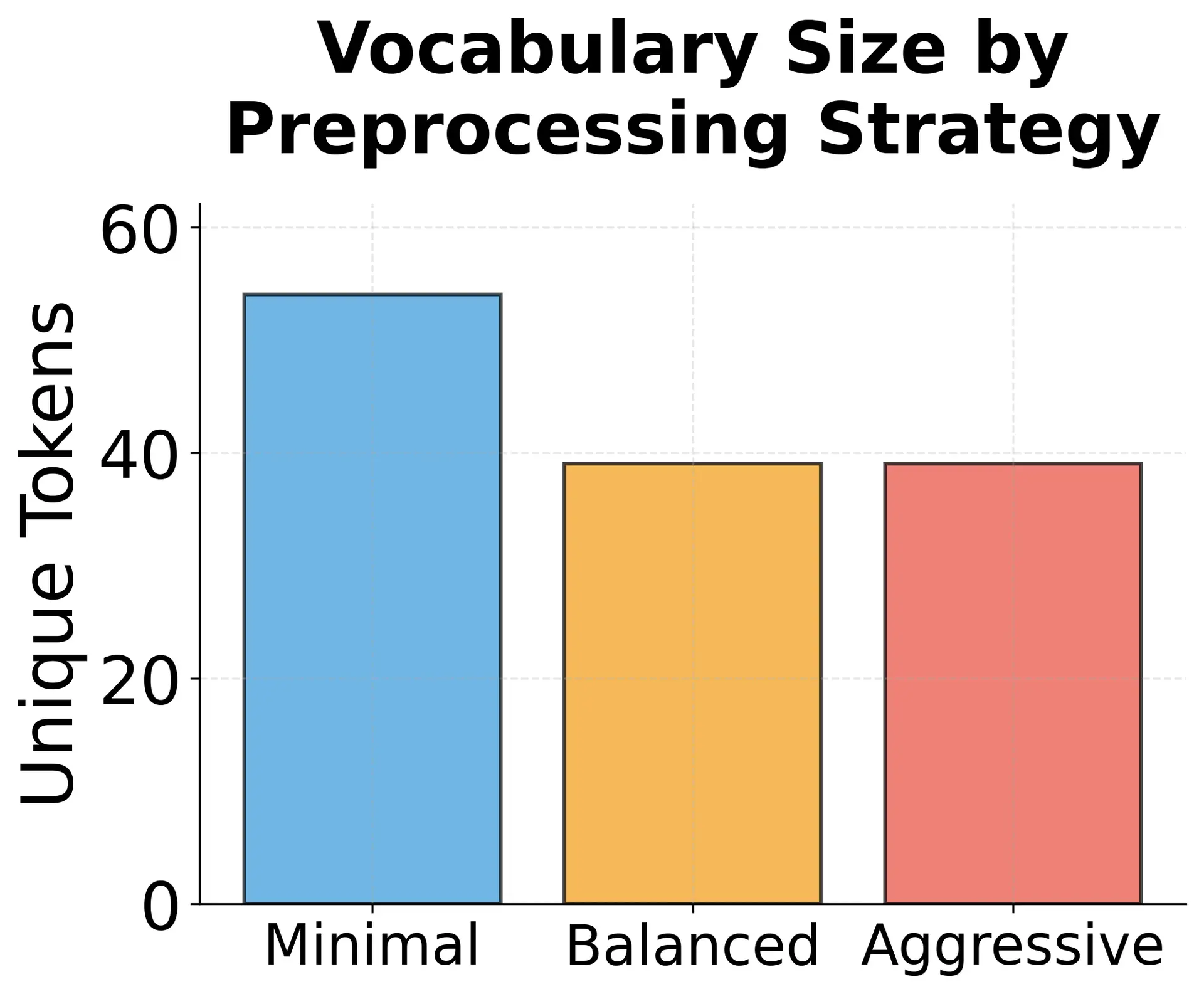
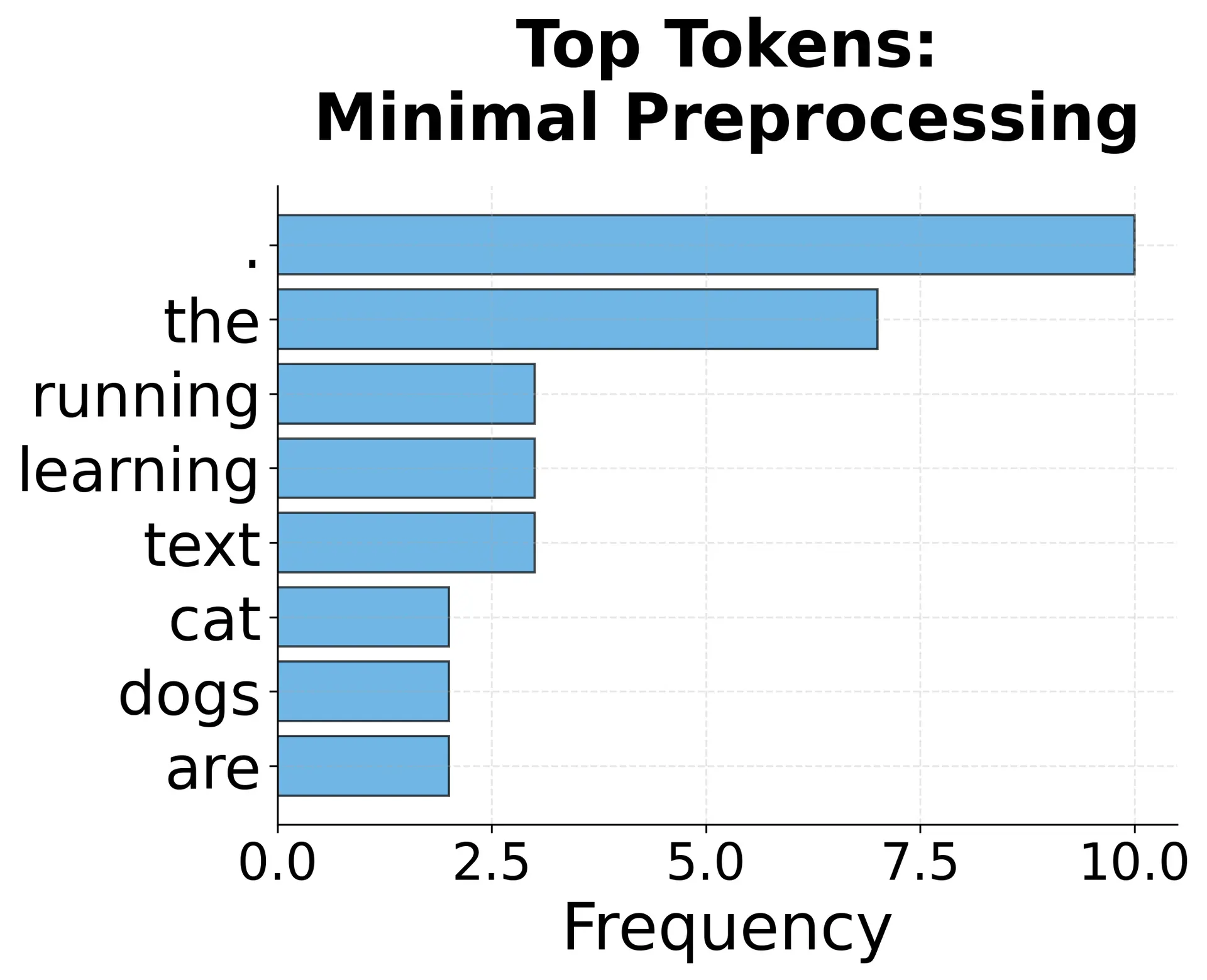
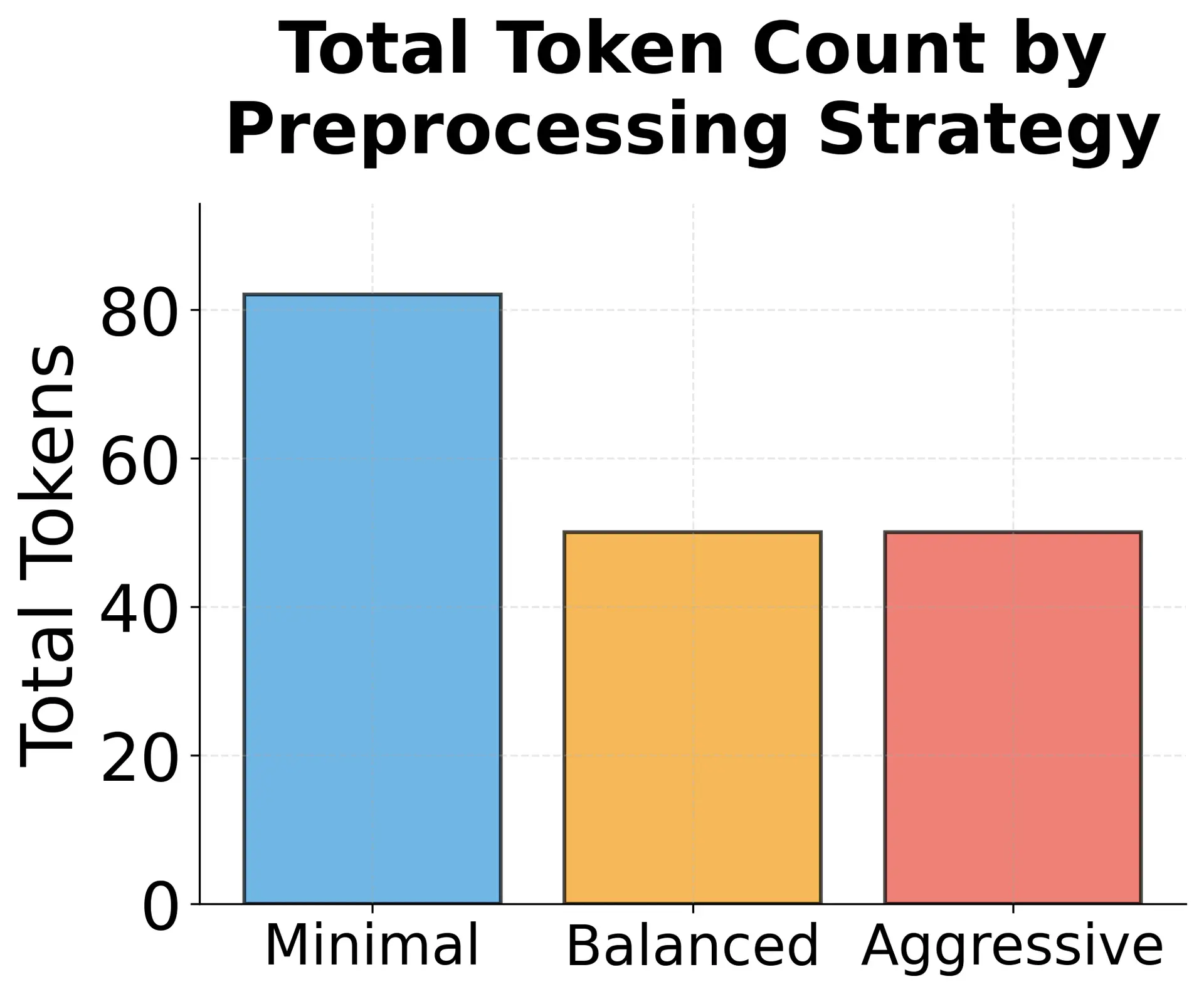
The visualization reveals several key insights:
- Vocabulary reduction: Aggressive preprocessing cuts vocabulary by 60-70% compared to minimal preprocessing
- Frequency distribution: Minimal preprocessing is dominated by stopwords, while aggressive preprocessing yields more uniform content word frequencies
- Token count: Total tokens decrease with more aggressive preprocessing, improving computational efficiency