

Learn how Self-Instruct enables language models to generate their own training data through iterative bootstrapping from minimal human-written seed tasks.

This article is part of the free-to-read Language AI Handbook
Choose your expertise level to adjust how many terms are explained. Beginners see more tooltips, experts see fewer to maintain reading flow. Hover over underlined terms for instant definitions.
Self-Instruct
In the previous chapter, we explored methods for creating instruction-tuning datasets, from expensive human annotation to various synthetic approaches. Each method involved trade-offs between quality, cost, and scale. What if a language model could generate its own training data? This seemingly circular idea turns out to be remarkably effective, opening up possibilities that were previously inaccessible to you without substantial annotation budgets.
Self-Instruct is a framework that enables large language models to bootstrap their instruction-following capabilities by generating their own training examples. Starting with just a handful of human-written seed tasks, the model iteratively produces thousands of diverse instructions along with their inputs and outputs. The approach addresses a fundamental bottleneck in instruction tuning: the difficulty of creating large-scale, diverse instruction datasets without massive human effort. By leveraging the model's own capabilities, Self-Instruct transforms data creation from a labor-intensive process into an automated pipeline.
The key insight behind Self-Instruct is that language models, even before instruction tuning, already possess substantial knowledge from pre-training. They understand language structure, know facts about the world, and can follow patterns demonstrated in context. This latent capability exists because pre-training on vast text corpora exposes models to countless examples of instructions and their completions, embedded naturally within documents, tutorials, and conversations. Self-Instruct leverages these capabilities, using in-context learning (which we covered in Part XVIII) to guide the model toward generating useful instruction-following examples. Rather than teaching the model something entirely new, the framework activates and structures knowledge the model already possesses.
The Self-Instruct Pipeline
Self-Instruct operates as an iterative bootstrapping process that gradually builds a diverse instruction dataset from minimal human input. The pipeline begins with a small set of human-written seed tasks and progressively expands this collection by having the model generate new tasks, validate them, and add the high-quality ones back to the pool. This cyclical approach means that each iteration enriches the context available for subsequent generations.
The core loop consists of four stages that repeat until the desired dataset size is reached. Each stage serves a specific purpose in ensuring both the quality and diversity of the final dataset.
- Instruction Generation: Sample existing tasks from the pool and prompt the model to generate new, diverse instructions. This stage leverages in-context learning to demonstrate the desired format and style.
- Classification Identification: Determine whether each generated instruction is a classification task (requiring a fixed set of output labels) or an open-ended generation task. This distinction is crucial because it affects how we generate training instances.
- Instance Generation: For each instruction, generate appropriate inputs and outputs using either input-first or output-first approaches. The choice of approach depends on the task type identified in the previous stage.
- Filtering: Remove low-quality, duplicate, or problematic examples before adding them to the task pool. This quality control step prevents degradation of the dataset over iterations.
This iterative approach creates a flywheel effect: as the task pool grows with diverse examples, the model has richer context for generating even more varied instructions. The expanding diversity of demonstrations enables the model to explore new directions it might not have discovered with only the original seed tasks. The process is self-reinforcing, though it requires careful filtering to prevent degradation. Without proper quality controls, errors and biases could accumulate across iterations, leading to progressively worse outputs.

Seed Task Design
The quality of Self-Instruct outputs depends critically on the initial seed tasks. These human-written examples establish the format, diversity, and quality standards that the model will follow when generating new tasks. Think of seed tasks as a template that defines what "good" looks like: the model learns to mimic their structure, variety, and level of detail. Poor seed design leads to limited, repetitive outputs, while thoughtful seed curation enables the generation of rich, diverse datasets.
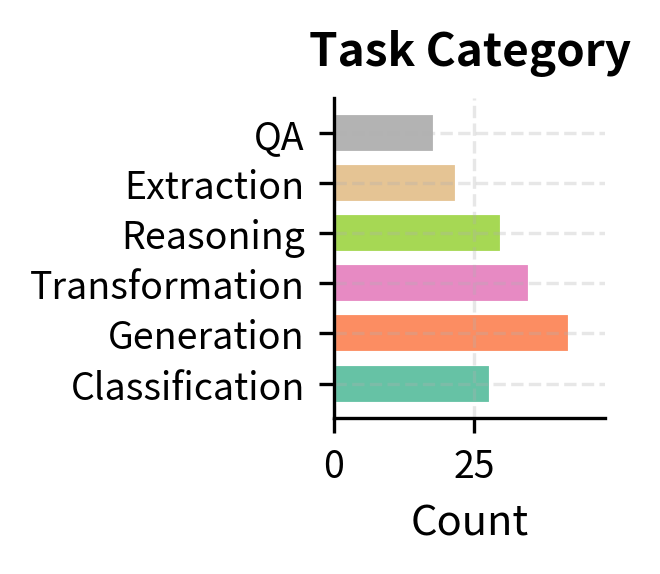
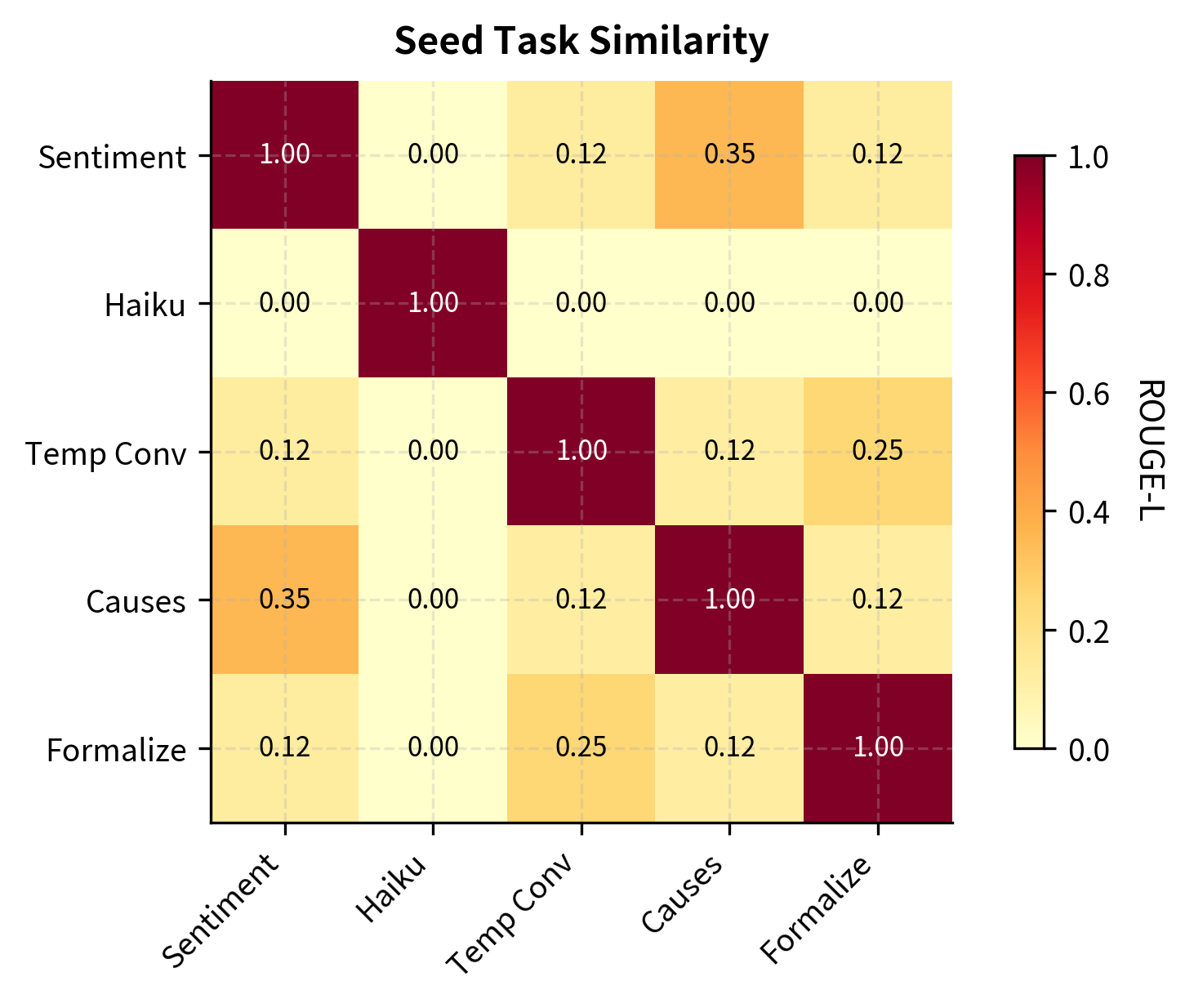
The original Self-Instruct paper used 175 seed tasks, each containing an instruction, optional input, and expected output. These seeds were designed to cover a broad range of task types, ensuring the model had exposure to many different patterns from the very beginning:
The seed tasks should exhibit several key properties that together establish a strong foundation for generation.
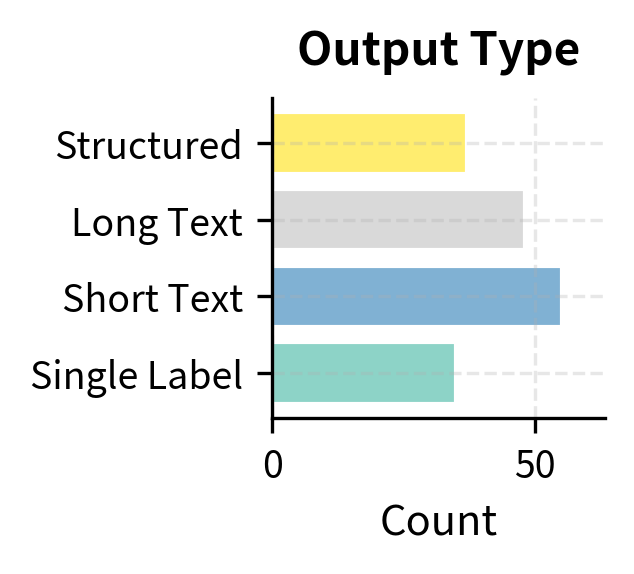
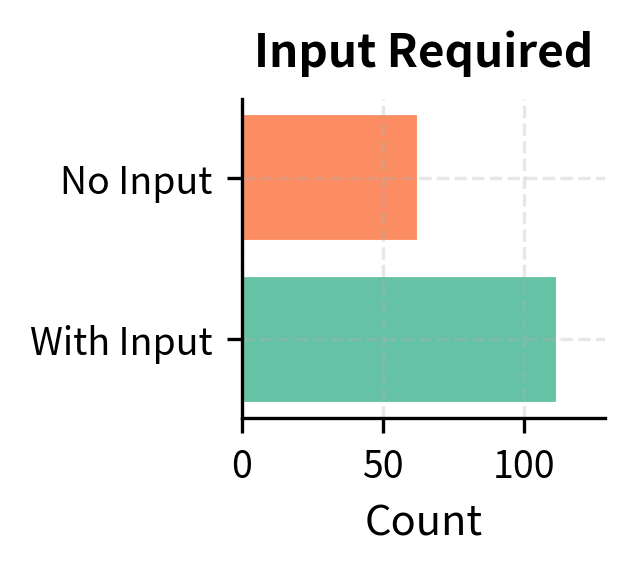
- Format diversity: Mix of tasks with and without inputs, varying output lengths and structures. Some tasks require only an instruction, while others need additional context provided as input.
- Topic coverage: Span different domains like science, arts, daily life, and abstract reasoning. This breadth ensures the model generates instructions across many subject areas rather than clustering around a single theme.
- Task type variety: Include classification, generation, transformation, and reasoning tasks. Each task type exercises different capabilities and produces different output patterns.
- Clear patterns: Demonstrate the expected instruction-input-output format unambiguously. The model should have no confusion about what each field contains or how they relate to one another.
Instruction Generation
With seed tasks established, the model generates new instructions through prompted generation. The approach samples several existing tasks from the pool and asks the model to create novel instructions inspired by, but different from, the examples. This in-context learning approach leverages the model's ability to identify patterns and generate variations that maintain the same structure while introducing new content.
The prompt structure is carefully designed to encourage diversity while maintaining quality. By showing the model a numbered list of existing instructions and asking it to continue the list, we tap into the model's natural tendency to generate coherent continuations:
The sampling strategy for selecting demonstration tasks is crucial for diversity. Rather than random uniform sampling, Self-Instruct uses a balanced approach that considers multiple factors.
- Recency bias: Slightly favor recently added tasks to explore new directions. This helps the generation process branch out from recently discovered instruction patterns rather than always returning to the same seed tasks.
- Diversity sampling: Ensure sampled tasks span different categories. If all demonstrations are sentiment classification tasks, the model will likely generate more sentiment classification tasks.
- Human seed inclusion: Always include some original seed tasks to maintain quality anchoring. The human-written examples serve as a quality floor, preventing drift toward lower-quality patterns.
When the model generates instructions, it often produces multiple candidates at once. The prompt asks for several new instructions, and the model continues generating until it hits a stop condition or maximum length. This batch generation approach is more efficient than requesting one instruction at a time:
The parsing function successfully extracts the core instruction text from the raw model output, removing numbering and whitespace. This step normalizes the data into a structured list ready for filtering and instance generation. The simplicity of this parsing reflects a key design principle of Self-Instruct: use straightforward, predictable formats that are easy to both generate and parse.
Classification Task Identification
After generating instructions, the pipeline determines whether each represents a classification task or an open-ended generation task. This distinction matters because the two task types require different instance generation strategies. Classification and generation tasks have fundamentally different output structures, and treating them identically would lead to suboptimal training data.
Classification tasks have a fixed, limited set of valid outputs (like sentiment labels or categories). The outputs for these tasks are constrained to a small vocabulary of options, and the model's job is essentially to select the correct label. Open-ended tasks can have diverse, creative outputs (like writing stories or answering questions). For these tasks, there is no single "correct" answer, and the space of valid responses is vast. The model makes this determination through another prompted generation:
The model correctly identifies the nature of each task, distinguishing between those requiring constrained labels (Classification) and those inviting open-ended text (Generation). Notice how the presence of explicit label options in the instruction (like "positive, negative, or neutral") provides a strong signal for classification tasks, while verbs like "write" or "explain" suggest generation tasks.
The classification distinction guides the next stage of the pipeline. Classification tasks benefit from output-first generation (where you first generate possible labels, then create inputs that would warrant each label). This approach ensures balanced representation across all label categories. Generation tasks work better with input-first approaches (where you create a plausible input, then generate an appropriate output). This order is more natural for open-ended tasks where the input context shapes what constitutes a good response.
Instance Generation
Once instructions are classified, the pipeline generates complete task instances consisting of inputs and outputs. This stage uses one of two strategies depending on the task type. The choice of strategy directly impacts the quality and balance of the resulting training data.
Input-First Approach
For open-ended generation tasks, the model first creates a plausible input, then generates the corresponding output. This approach works well when the input constrains what kind of output makes sense: given a specific article to summarize, there are many valid summaries, but they should all reflect the article's content. By generating the input first, we establish a concrete context that grounds the output generation.
The prompt explicitly instructs the model to generate the input context first, establishing a scenario that makes the subsequent output generation more natural and coherent. The demonstrations show the model what kind of inputs are appropriate for this task type and how outputs should relate to those inputs. This sequential structure mimics how humans would approach such tasks: first understand the context, then produce a response.
Output-First Approach
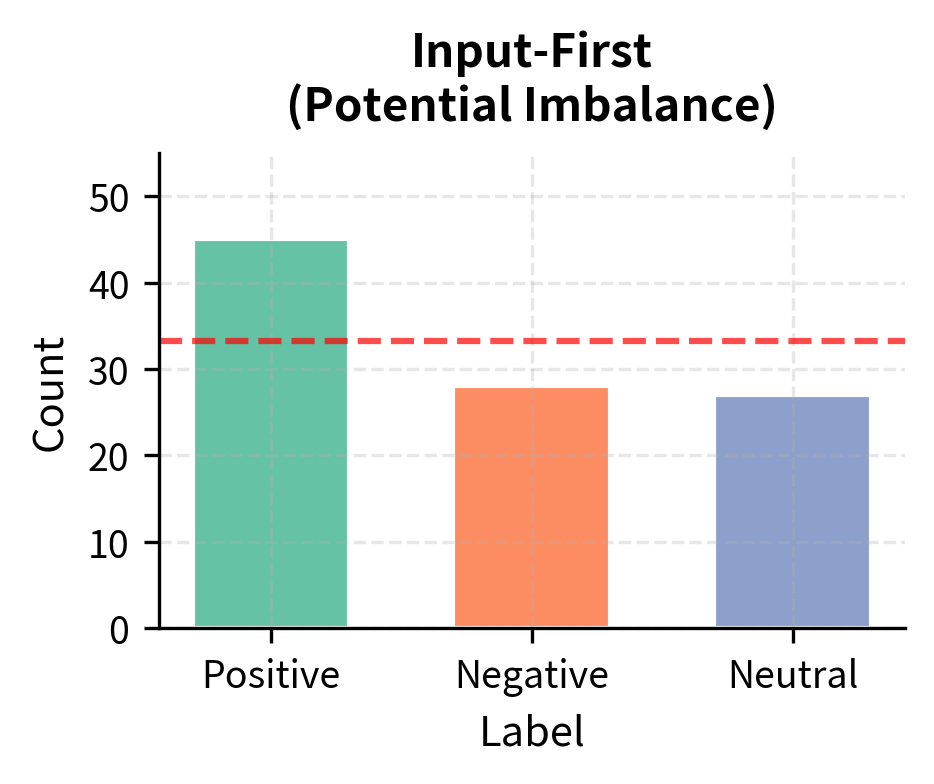
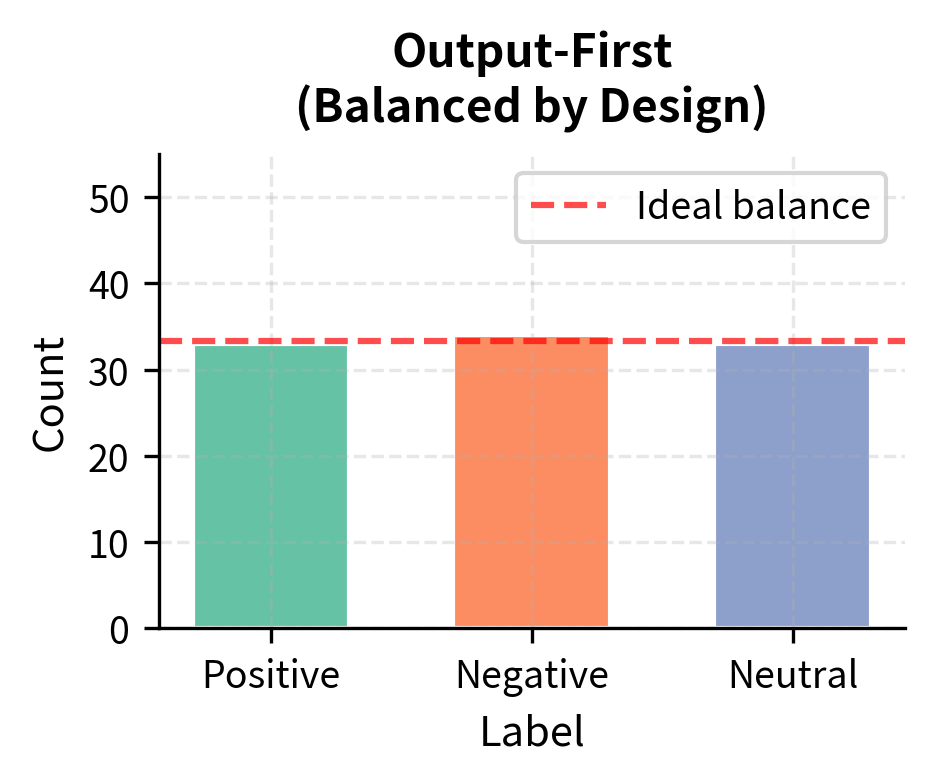
For classification tasks, generating labels first and then creating matching inputs produces more balanced datasets. This ordering might seem counterintuitive at first, but it addresses an important practical problem. If you generate inputs first, the model might repeatedly create inputs that warrant the same label, leading to imbalanced class distributions. For example, when generating sentiment examples, a model might produce mostly positive reviews simply because they are easier to write or more common in training data.
The output-first approach cycles through labels, requesting inputs for each one in turn. This ensures roughly equal representation of each class in the final dataset. By explicitly specifying which label to generate an example for, we force the model to create inputs that genuinely warrant that label rather than defaulting to the most common or easiest case. The result is a more balanced dataset that trains models to distinguish between all categories effectively.
Filtering Strategies
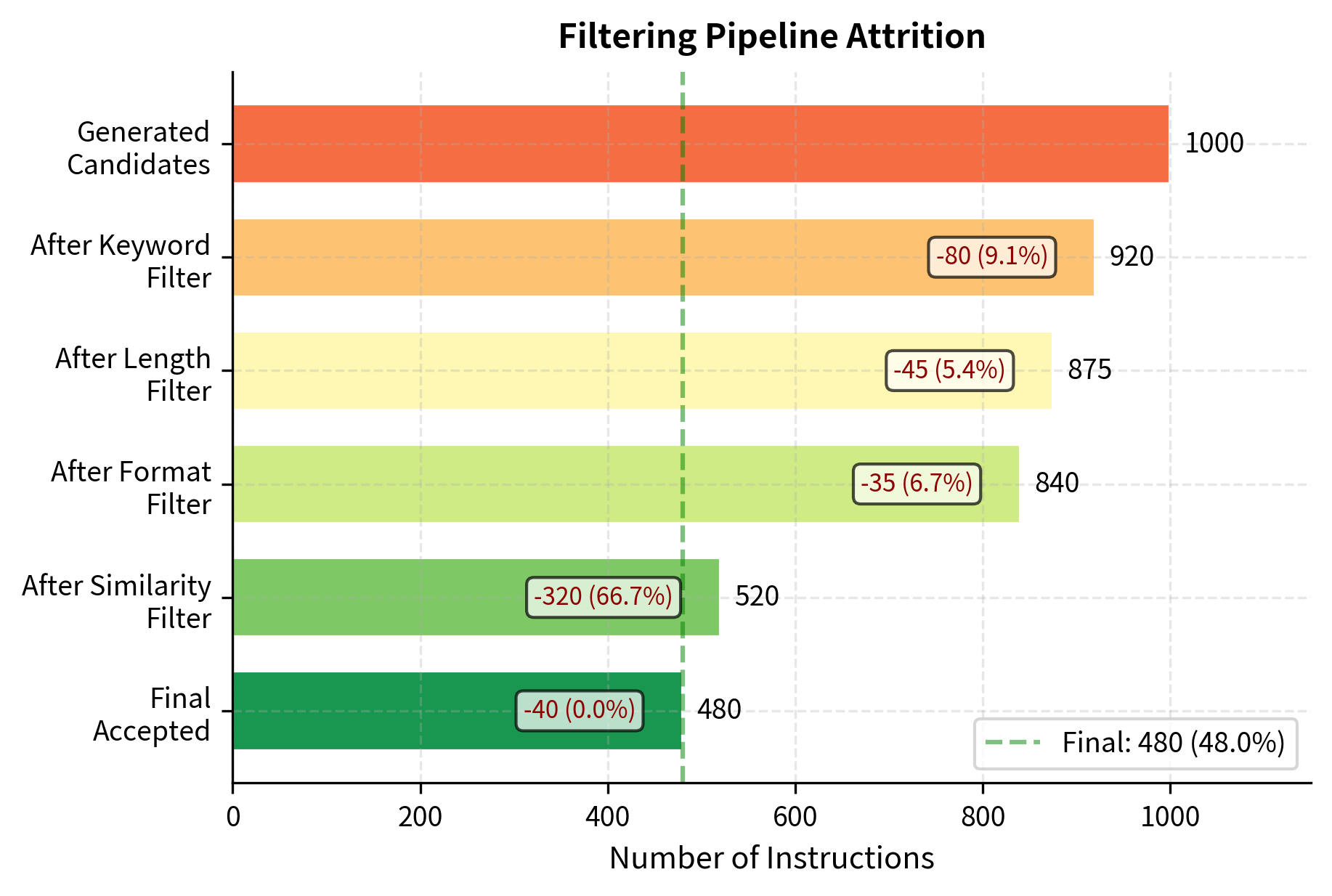
Raw generated data contains significant noise: duplicate instructions, low-quality outputs, formatting errors, and examples that are too similar to existing ones. Filtering removes these problematic cases before they contaminate the task pool. Without rigorous filtering, the iterative nature of Self-Instruct would cause errors to compound over time, degrading the quality of each successive generation.
ROUGE-Based Similarity Filtering
The most important filter prevents near-duplicate instructions from entering the pool. New instructions that are too similar to existing ones add no diversity and waste annotation budget. If two instructions are nearly identical, including both provides little additional signal during training. Self-Instruct uses ROUGE-L similarity to measure instruction overlap, comparing the longest common subsequence between instruction texts.
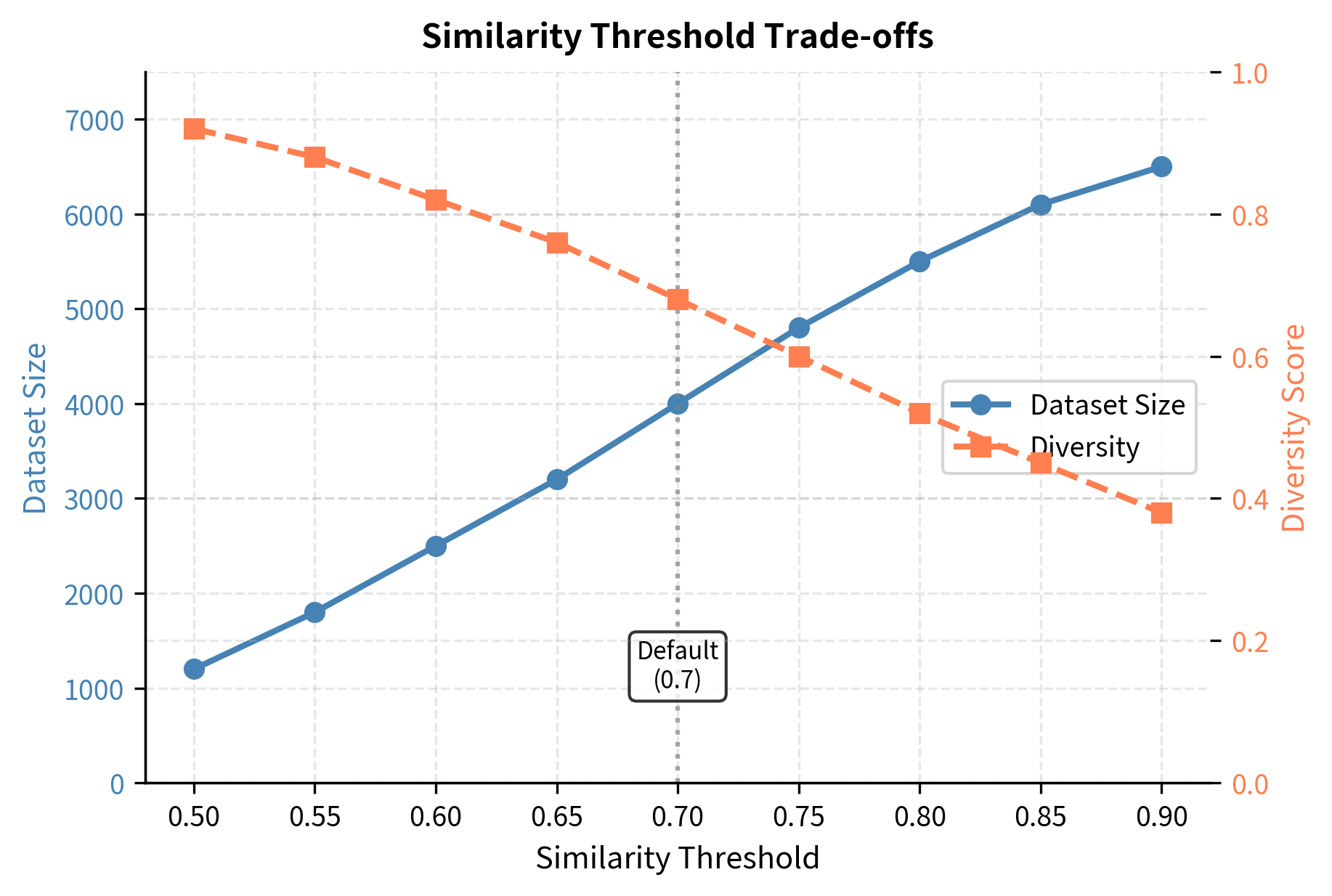
The threshold of 0.7 ROUGE-L similarity balances diversity against strictness. Lower thresholds enforce more diversity but risk rejecting valid variations that might provide useful training signal. Higher thresholds allow more similar instructions, potentially reducing dataset diversity. The choice of 0.7 reflects empirical testing showing it effectively removes near-duplicates while accepting meaningfully different instructions.
Length and Format Filtering
Simple heuristics catch many problematic generations without requiring complex analysis. These filters check basic structural properties that valid instructions should satisfy:
The filters successfully accept valid instructions while rejecting those that are too short, repetitive, or empty, preventing low-quality data from polluting the pool. These simple checks are computationally cheap but catch a surprising number of problematic cases, making them an efficient first line of defense.
Keyword-Based Filtering
Certain keywords indicate problematic instructions that should be excluded. These include self-references, meta-commentary, and requests for capabilities the model lacks. Keyword filtering acts as a semantic safety net, catching issues that structural filters would miss:
These results demonstrate that the keyword filter effectively catches blocked terms like "image" or context-dependent phrases that would be inappropriate for a standalone instruction dataset. Instructions referencing images cannot be completed by text-only models, and those depending on previous conversation lack the necessary context. By filtering these early, we avoid generating instances that would be useless or misleading during training.
Complete Self-Instruct Implementation
Let's bring together all components into a working implementation that demonstrates the full pipeline. For demonstration purposes, we'll use a mock language model, but the structure mirrors how you would integrate with real APIs. The modular design makes it straightforward to swap in actual model calls when deploying this approach in practice:
Quality and Diversity Metrics
Evaluating Self-Instruct outputs requires measuring both quality and diversity. A large dataset of repetitive instructions is no better than a small, diverse one. In fact, redundant data wastes computational resources during training and may cause the model to overfit to particular patterns. Comprehensive metrics help us understand whether our generation pipeline is producing genuinely useful training data.
Diversity Metrics
Diversity can be measured at multiple levels, from individual word choices to overall structural patterns. Each metric captures a different aspect of what makes a dataset varied and comprehensive:
These metrics provide a quantitative view of the dataset's richness. A type-token ratio above 0.5 and high verb diversity suggest the instructions cover a wide range of actions and topics, rather than repeating the same few patterns. The length standard deviation indicates whether the dataset includes both short, focused instructions and longer, more detailed ones. Together, these measurements give a holistic picture of diversity that helps guide further data generation or filtering decisions.

Pairwise Similarity Distribution
The distribution of pairwise similarities reveals whether the dataset has clusters of similar instructions or maintains broad diversity. This analysis goes beyond simple metrics to show the actual structure of relationships within the dataset:
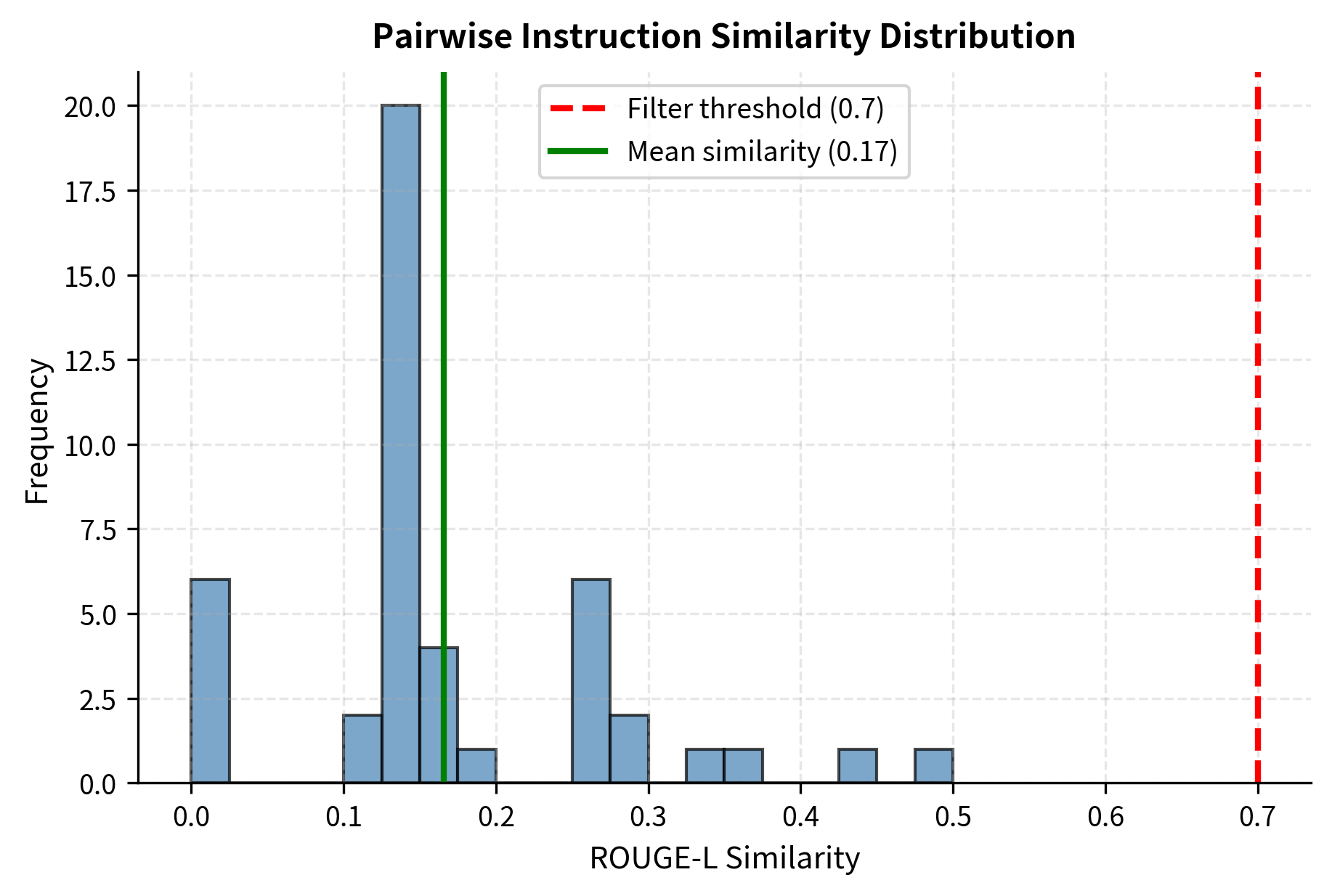
A well-functioning Self-Instruct pipeline produces a left-skewed distribution where most instruction pairs have low similarity. This pattern indicates that the dataset contains many distinct instructions rather than variations on a few themes. The similarity threshold (typically 0.7) prevents the right tail from growing with near-duplicate instructions, maintaining the overall diversity of the pool.
Scaling Self-Instruct
The original Self-Instruct paper generated over 52,000 instructions using GPT-3, starting from just 175 seed tasks. This dramatic expansion demonstrates the power of the bootstrapping approach: minimal human effort yields a large-scale dataset. However, the iterative process shows diminishing returns: early iterations add many novel instructions, while later iterations increasingly generate duplicates or near-duplicates that get filtered out.
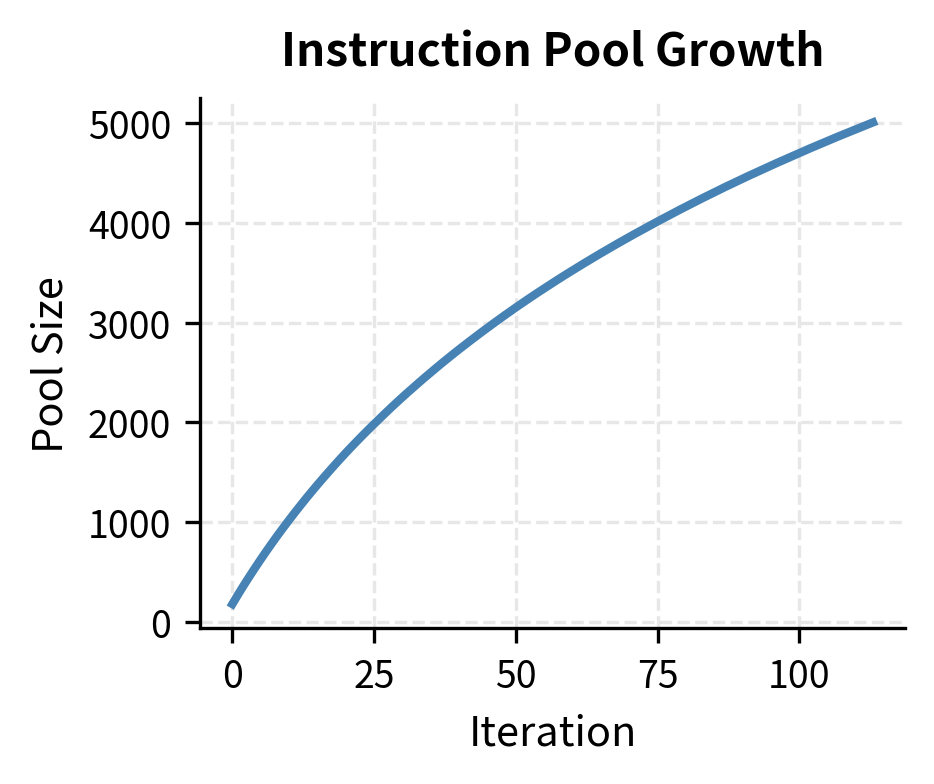
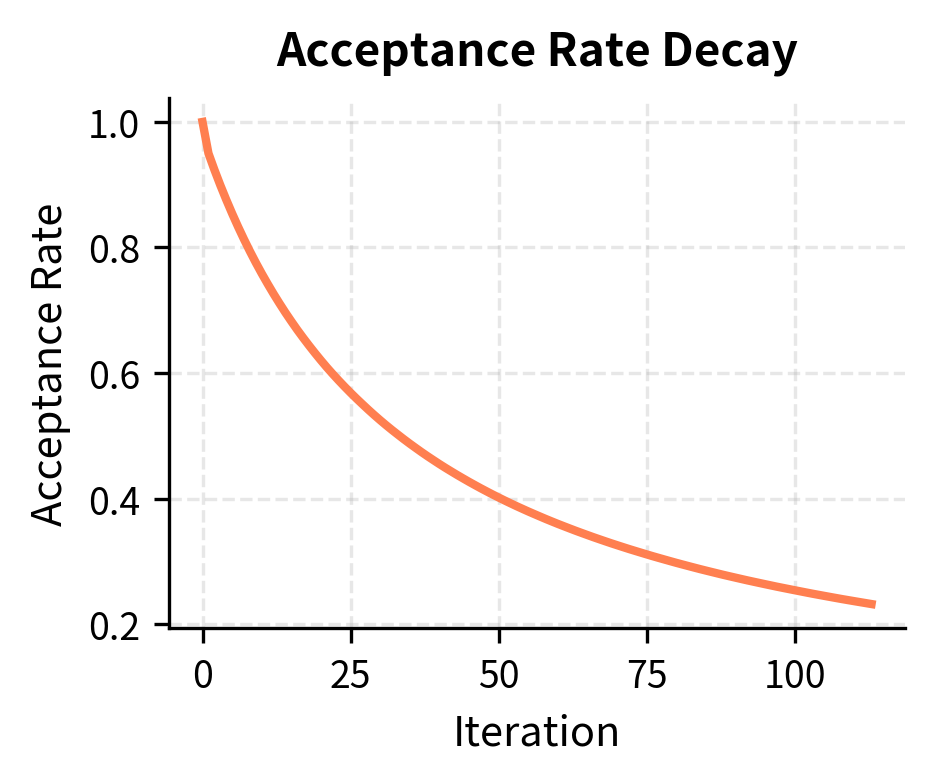
The acceptance rate decay creates a natural ceiling on dataset size. As more instructions enter the pool, the probability that any new generation is sufficiently different from all existing instructions decreases. This phenomenon reflects a fundamental constraint: the space of "useful, distinct instructions" is large but finite for any given domain and prompt structure.
To push beyond this ceiling, you can employ several strategies that help explore new regions of the instruction space.
- Expanding seed diversity: Adding more diverse seed tasks opens new instruction spaces. If seeds cover a new domain or task type, the model can generate variations in that direction.
- Topic-constrained generation: Prompting for instructions in specific underrepresented domains. By explicitly asking for instructions about particular subjects, you can fill gaps in coverage.
- Relaxing similarity thresholds: Trading some diversity for volume (with quality trade-offs). This allows more similar instructions through but requires careful evaluation of the resulting dataset.
- Multiple model sources: Using different models to generate instructions, each with its own biases. Different models may explore different parts of the instruction space, leading to greater overall diversity.
Limitations and Impact
Self-Instruct democratized instruction tuning by eliminating the need for large human annotation budgets. Before Self-Instruct, creating instruction-following models required either access to proprietary datasets (like InstructGPT's human demonstrations) or significant manual effort. After Self-Instruct, you could bootstrap instruction data from any sufficiently capable language model. This shift opened up instruction tuning research to a much broader community.
The approach demonstrated that language models contain latent instruction-following knowledge from pre-training that can be "unlocked" through carefully structured prompting and filtering. This insight influenced subsequent work on prompting strategies and synthetic data generation, showing that creative use of existing capabilities can substitute for expensive data collection.
However, Self-Instruct has important limitations that you must understand. The generated data inherits biases and errors from the source model. If the model has misconceptions about certain topics, those misconceptions propagate into the training data. The iterative nature can amplify these issues: errors in early generations influence later generations, creating feedback loops that entrench problematic patterns.
Quality control remains challenging. While heuristic filters catch obvious problems (length issues, duplicates, formatting errors), they cannot verify factual accuracy or catch subtle logical errors. A Self-Instruct dataset might contain confident but incorrect explanations that a human annotator would catch. This limitation means that Self-Instruct data often requires additional human review for high-stakes applications.
The approach also struggles with task types that require genuine creativity or specialized knowledge. Generated instructions tend to cluster around patterns the model has seen frequently during pre-training. Truly novel task formulations, or tasks requiring deep domain expertise, rarely emerge from the self-instruct process. The model essentially remixes what it knows rather than inventing fundamentally new concepts.
Finally, there are concerns about model collapse, where models trained on synthetic data from other models progressively lose capability or diversity. Training exclusively on Self-Instruct data without human-quality checks can lead to models that generate plausible-sounding but degraded outputs. You can mix Self-Instruct data with human-annotated examples to maintain quality anchoring and prevent this degradation over successive training cycles.
Despite these limitations, Self-Instruct remains influential. It established synthetic data generation as a viable paradigm for instruction tuning and paved the way for more sophisticated approaches like Evol-Instruct and WizardLM, which we'll encounter when discussing instruction format in the next chapter.
Summary
Self-Instruct enables language models to generate their own instruction-tuning data through an iterative bootstrapping process. Starting with a small set of human-written seed tasks, the pipeline generates new instructions, classifies them as classification or generation tasks, creates input-output instances, and filters for quality before adding them to the growing task pool.
The key components of the pipeline include the following.
- Instruction generation using in-context learning with sampled demonstrations
- Task classification to determine whether output-first or input-first instance generation is appropriate
- Instance generation strategies tailored to task type
- Multi-stage filtering using ROUGE similarity, length constraints, and keyword blocking
Diversity emerges from careful prompt design and the iterative nature of the process, though acceptance rates decay as the pool grows and novel instructions become harder to generate. The approach trades some quality for scale, making it suitable for bootstrapping but often requiring human curation for production use.
Self-Instruct demonstrated that large language models contain substantial instruction-following capability that can be activated through the right training data, even when that data is generated by the model itself.
Quiz
Ready to test your understanding? Take this quick quiz to reinforce what you've learned about Self-Instruct and bootstrapping instruction-tuning datasets.

Comments